TOPDON Phoenix Lite 2 vs ArtiDiag900BT: Which Type of Scanner Do You Need?

In this guide
Two TOPDON scanners can both advertise all-system diagnostics while serving different types of buyers. The ArtiDiag900BT is a seven-inch Bluetooth tablet with a clearly marketed set of 28 maintenance functions and an explicit US update policy. The Phoenix Lite 2 is positioned as a more workshop-oriented system with more extensive diagnostic categories and professional-workflow features. A higher product tier, however, does not automatically mean a needed function works on a particular car.
Affiliate disclosure: As an Amazon Associate I earn from qualifying purchases.
This comparison uses TOPDON USA’s published product information. We have not used either scanner or measured wireless performance, repair success or reliability. Confirm the Phoenix Lite 2’s exact coding, reporting and vehicle-function coverage in the current regional software before paying for a workshop capability you expect to use.
Quick verdict: Investigate ArtiDiag900BT first when you’re a DIY owner who has confirmed the required maintenance routines and can justify its renewal costs. Investigate Phoenix Lite 2 if you’re managing a broader repair workload and can verify a specific capability that the ArtiDiag does not deliver. Avoid purchasing either based only on general “professional” branding.
Comparison of purchase factors
| Area | ArtiDiag900BT | Phoenix Lite 2 | Buying implication |
|---|---|---|---|
| Display | 7-inch touchscreen | 8-inch touchscreen; 1280 × 800 | Compare screen size and working space |
| RAM and storage | 2 GB RAM; 32 GB storage | 2 GB RAM; US page offers 16/32 GB storage | Confirm the exact storage variant; global documents differ |
| Processor and software | Check current regional hardware revision | 2.0 GHz quad-core; Android 10 in TOPDON’s technical sheet | Hardware age and support matter alongside features |
| Battery capacity | 6,300 mAh | 12,600 mAh | Rated capacity is not a measured runtime comparison |
| Vehicle connection | Bluetooth VCI | Wireless MDCI Lite VCI | Match the original VCI and kit contents |
| Diagnostics and active tests | Full-system diagnosis and bidirectional controls | Full-system diagnosis and bidirectional controls | Confirm each target module and operation |
| Service categories | 28 advertised categories | 35 on current US page; older artwork says 28+ | Counts describe a catalog, not every vehicle |
| Included software updates | 2 years, then optional paid annual renewal | 2 years, then optional paid annual renewal | Request current renewal terms for the exact serial |
| Coding and gateway access | Vehicle-dependent; separate authorization may apply | Online coding and VAG guidance advertised; vehicle-dependent | Neither feature establishes J2534 pass-through capability |
Hardware specifications come from TOPDON’s product pages and Phoenix Lite 2 technical sheet. The current US store offers 16 GB and 32 GB variants, while global sheets list 32/64 GB and the user manual lists 64 GB. Check the offered unit’s storage rather than treating those regional documents as one identical SKU. TOPDON’s current US feature list also says 35 services although older images say 28+.
ArtiDiag900BT: clear boundaries for a broad DIY tool

TOPDON lists 28 maintenance service types, bidirectional controls, full-system diagnostics, and a wireless connection for ArtiDiag900BT. The US product page specifies a seven-inch display, an included VCI, a two-year included update period and optional paid annual renewal. These are usable buying facts, but the service-menu count is not 28 guaranteed procedures on every supported vehicle.
When your planned jobs include widely advertised categories such as battery reset, steering angle, brake reset or supported ABS functions, the model may be a reasonable starting point. It also provides a commercial path for readers comparing their first advanced scanner against a more costly workshop platform. We would still request confirmation of each target vehicle and its specific function before recommending an Amazon SKU.
Where it can be the wrong choice: if you need a specialist programming interface, secure OEM online function, heavy-duty vehicle support, or other capability not specifically confirmed for this model. Describing general ECU coding is not proof of unrestricted module replacement programming.
Phoenix Lite 2: what a workshop buyer should verify
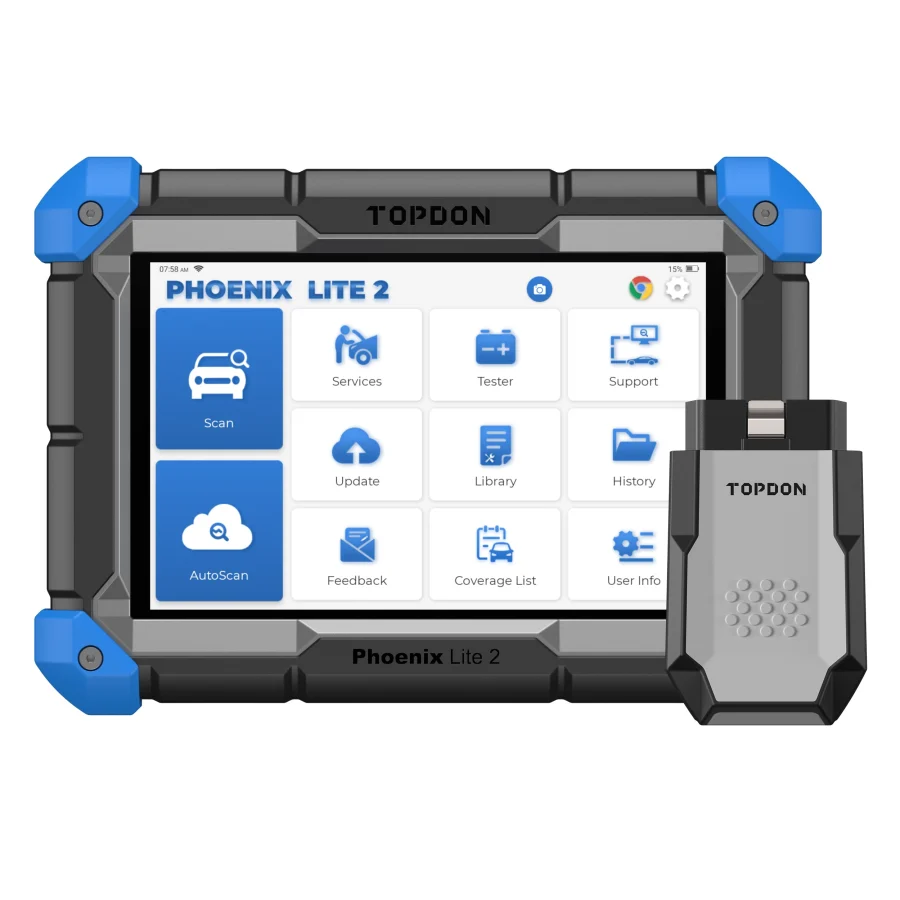
Phoenix Lite 2 adds an eight-inch screen and a larger rated battery to the comparison. TOPDON documents a wireless MDCI Lite interface, live-data recording/graphing, active tests, online coding and VAG guided functions. Those features can matter when a workshop needs a documented coding or guided workflow on supported cars; they do not establish unrestricted OEM programming.
Check the bundle: TOPDON’s technical sheet lists the tablet, MDCI Lite, power/USB cables, OBD extension and several older-vehicle adapters. Amazon kits may differ. The optional BTMobile ProS battery tester is an accessory, so confirm inclusion before expecting physical battery testing. Also verify replacement-VCI pairing and regional warranty eligibility.
A small garage should name a job that justifies the larger platform. If both tools cover the same required service routines on its regular vehicles, screen size and a longer feature catalog alone may not justify extra ownership cost. Ask for the exact model-year/module/function result in TOPDON’s coverage system.
How to compare updates fairly
Both US product pages include two years of software updates and publish optional annual renewals. Phoenix Lite 2 has a separate renewal tier from ArtiDiag900BT, so use the current manufacturer quote for each model rather than assuming the fees match. The correct three-year ownership equation is:
Hardware purchase + required accessories + renewals actually purchased + account/access fees required for your jobs.
Compare the same ownership period and renewal assumptions for both models. A buyer who keeps the same older vehicles may renew infrequently; a workshop servicing newer models may need current updates. Both assumptions must be made explicit. The scanner update costs guide offers a worksheet rather than a misleading universal figure.
Vehicle coverage matters more than brand or tier
Prepare a list of the actual repair jobs and vehicle models. For instance, “Can read transmission codes” is less helpful than “Can access the TCM and the specified gear-adaptation routine on a particular model-year vehicle, in the US software package.” A brand-level compatibility claim is insufficient. Manufacturer support may need the VIN, production date, ECU type or software version before answering.
If the work involves restricted security functions, verify the legitimate authorization workflow as well. Some automakers control gateway access or require independent registration and subscriptions. A tool’s general diagnostic capability does not bypass those rules. Our Secure Gateway and AutoAuth guide explains the distinction.
Ownership and accessory risks
The Phoenix product family uses separate VCI hardware for certain workflows. TOPDON’s official serial-number instructions say that Phoenix-series software renewals use the VCI serial number, whereas many simpler tools use the main-unit serial. That detail matters when buying a used kit or assessing a replacement VCI. Always match the hardware bundle to the account and entitlement recorded by the manufacturer.
The ArtiDiag900BT has its own included dongle and carrying accessories. For either scanner, verify that the accessory photographed in an online listing is the exact original device and not a generic compatible-looking adapter. Seller authenticity, warranty eligibility and regional terms are separate questions from feature claims.
Check the output your workshop actually needs
If a report is part of the reason to choose the Phoenix platform, ask to see the output from that exact model and software package. Check whether it identifies the vehicle and scanned modules, preserves code status, and can be saved in the format your work requires. A generic screenshot from a different TOPDON tablet does not answer those questions. If the main task is a supported maintenance routine, a more elaborate reporting workflow may have little value. Keep the reporting, coding and service-function questions separate so that one attractive demonstration does not stand in for the capability you need to confirm.
Frequently asked questions
Is Phoenix Lite 2 always better than ArtiDiag900BT?
No. A larger professional feature catalog is beneficial only when the required functions are actually supported and used. The ArtiDiag may be suitable for a focused user, while a shop may need functions available on a more advanced device.
Does ECU coding mean J2534 programming?
No. Coding, adaptation, active tests and pass-through programming are different. Verify the actual standard and OEM software pathway before purchasing.
Can I move a Phoenix VCI to another tablet?
Don’t assume unrestricted pairing or entitlement transfer. Ask TOPDON support for compatibility and account-binding information for the specific serial numbers.
Is the official manufacturer price the Amazon selling price?
No. Retailer offers change. Confirm the exact Amazon.com US listing, manufacturer warranty eligibility and variant independently. Do not republish unverified pricing.
Final recommendation
ArtiDiag900BT is the more focused candidate for verified advanced DIY service tasks; Phoenix Lite 2 is a research candidate for a genuine workshop workload. The defensible comparison hinges on documented vehicle functions, US product generation, VCI contents and renewal terms, not broad marketing labels.