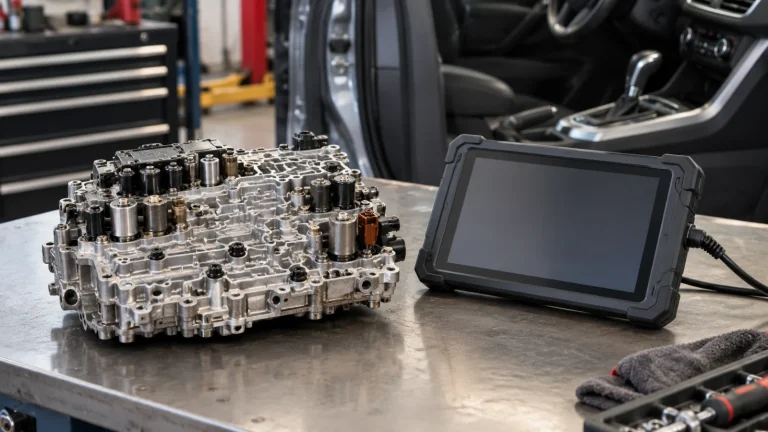
Best Scan Tools for ABS Bleeding: 6 Options and Critical Coverage Checks

In this guide
A scan tool can be useful for a brake repair if the vehicle requires a diagnostic command to activate the ABS hydraulic control unit or enter a supported bleeding routine. But the difference between “ABS codes,” “ABS active tests,” and “ABS bleeding” is essential. They are not interchangeable features, and none proves that a specific vehicle’s service procedure is supported.
Affiliate disclosure: As an Amazon Associate I earn from qualifying purchases.
Quick verdict: Six models worth checking are the Innova 5610, TOPDON ArtiDiag900 Lite, XTOOL D7S, Autel MK900BT, TOPDON ArtiDiag900BT, and XTOOL D8S. Their manufacturers publish ABS-bleeding or relevant active-test capabilities at the model level. However, no model is confirmed here as suitable for every vehicle. The right one is whichever the manufacturer confirms can run your precise ABS/HCU procedure on your exact year, make, model, configuration and software region. For many owners, that verification matters more than choosing the most expensive tablet.
This is a researched purchasing guide, not a brake-repair tutorial. We did not perform any repairs or test scanner functions on vehicles. Brake hydraulics are safety-critical: follow the exact manufacturer’s service information and use qualified professional assistance when needed. A scan tool does not replace correct brake fluid, mechanical inspection, suitable bleeding equipment, the specified service sequence or a final safety assessment. Do not drive a car with uncertain brake operation.
Quick comparison: six manufacturer-documented ABS candidates
| Scanner | Advertised ABS-related capability | Best reason to investigate | Software-update information | Caution |
|---|---|---|---|---|
| Innova 5610 | ABS-bleeding routine and active tests | Vehicle coverage checker and handheld format | Free updates/no subscription per Innova | US/Canada region; specific functions vary |
| TOPDON ArtiDiag900 Lite | ABS bleeding among eight service categories | Wireless VCI and straightforward service menu | Free updates for supported device lifetime under US policy | Not every ABS module or car is supported |
| XTOOL D7S | ABS bleeding in service list and active tests | Wired tablet, listed CAN FD/DoIP | Three years included | Target vehicle and routine must be confirmed |
| Autel MK900BT | ABS bleeding and active tests in official model overview | Wireless tablet and modern protocol listings | Confirm SKU-specific entitlement | Model families and function names can be confused |
| TOPDON ArtiDiag900BT | ABS bleeding among 28 service categories | Expanded TOPDON service menu and wireless VCI | Two years included | Future optional renewal and module coverage |
| XTOOL D8S | ABS bleeding, actuator tests and advanced functions | Broader system troubleshooting, topology map | Three years included | Advanced features may be unnecessary for a single brake job |
The column says advertised, not “verified on your vehicle.” A model-level ABS-bleeding statement is useful evidence that the product class offers such a feature. It does not prove the manufacturer’s database covers the hydraulic control unit in a particular Toyota, Ford, Jeep, Chevrolet, BMW or other model. Some vehicle procedures use different terminology or require special access beyond a generic ABS menu.
Why an ABS-bleeding function may matter
Anti-lock braking systems include electronic control and hydraulic components that may need particular service routines when air enters certain parts of the system. In some vehicle designs, a diagnostic tool activates a pump or valves to help address trapped air. Other vehicles or repair situations have different instructions, and a scan-tool cycle may not be required at all.
A service document made available through the US National Highway Traffic Safety Administration illustrates the distinction: it treats base brake bleeding and the ABS portion as separate stages in a specific manufacturer’s service sequence. That example explains why merely owning a scanner does not replace the vehicle-specific repair procedure. It is not a universal set of steps to apply to another vehicle.
Innova also expressly warns that the 5610’s advertised ABS-bleeding support does not mean the scanner will bleed most vehicles by itself. Depending on the vehicle, the function may activate a system or guide the technician through a procedure while conventional bleeding work remains necessary. We should apply that caution to the category as a whole, without assuming that each manufacturer implements routines identically.
The first purchasing question is therefore not “Which scanner has an ABS button?” It is “Which exact diagnostic operation does my vehicle’s approved repair procedure require?” The answer may involve an ABS hydraulic control unit, electronic stability control module, a named automated bleed utility or an OEM scan tool workflow. That choice determines what third-party tool evidence is sufficient.
1. Innova 5610 — easy-to-check North American handheld candidate
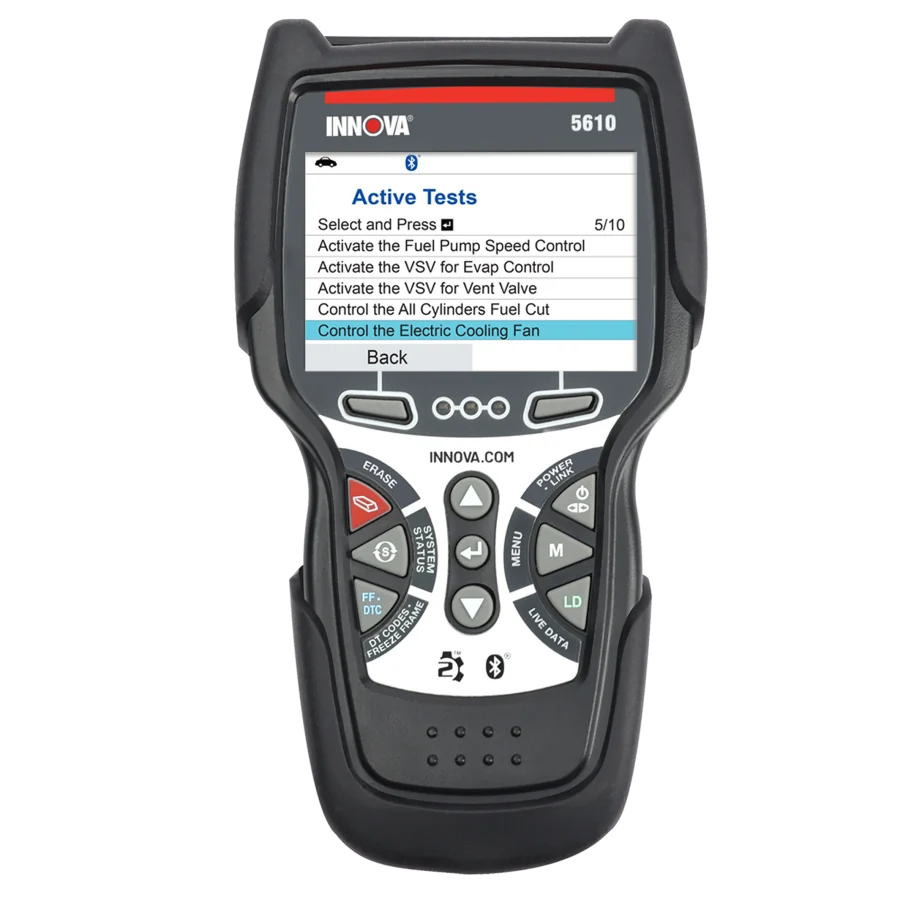
The Innova 5610 is a handheld scan tool with manufacturer-advertised bidirectional tests, full-system diagnostics and workshop routines. Innova specifically lists ABS bleeding among its available services. Its US website offers a year/make/model/engine compatibility checker intended to show which actions are available for a particular vehicle. That is a meaningful purchasing advantage compared with a vague promise that the scanner supports all cars.
Innova’s 2026 materials also make an important limitation explicit: the device may cycle the ABS system or guide a bleeding process, but mechanical brake bleeding is still often necessary. Buyers should not read “ABS bleeding” as a self-contained hydraulic repair. The manufacturer’s current website says updates are free and there is no subscription fee for the 5610, which can simplify ownership planning.
Why it may fit: You own a US- or Canada-market vehicle and the coverage checker confirms the ABS-specific routine named in your service information. You prefer a dedicated handheld interface over a larger tablet and want clearly stated software-cost terms.
Important limits: Innova says functions vary with exact vehicle configuration and warns about newer FCA secure-gateway restrictions. A general statement of ABS code reading or all-system diagnosis is not enough. If the coverage checker provides only “ABS system” without a named bleed function, seek written confirmation. The scanner is not intended as a universal tool for overseas-market vehicles.
Before ordering: Record the exact checker result and question, hardware revision, region and named function. If the manufacturer cannot confirm your target procedure, do not assume it will work. Read our compatibility verification guide for a simple evidence log.
2. TOPDON ArtiDiag900 Lite — wireless option with eight listed routines
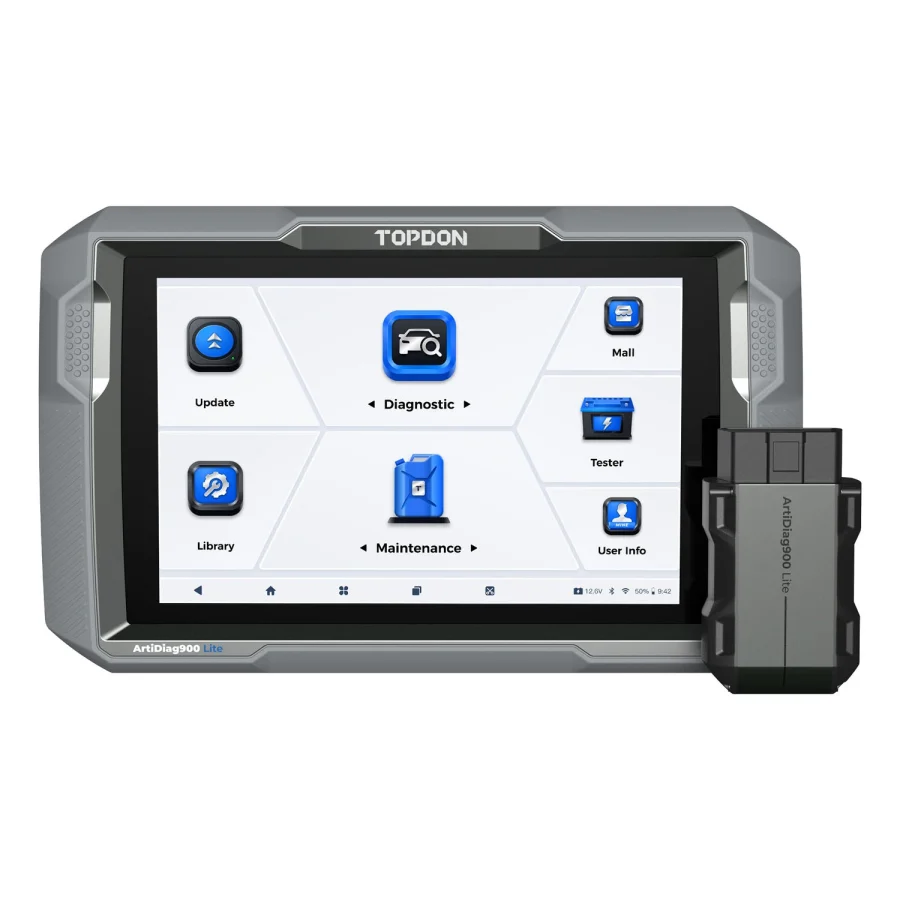
TOPDON’s US ArtiDiag900 Lite page describes an eight-inch wireless diagnostic tablet with active tests and eight named service functions. ABS bleeding is expressly included. It also has full-system diagnostic capabilities on supported vehicle models. The product’s wireless VCI can be convenient when viewing data from different positions around a stationary vehicle, but Bluetooth connectivity has no inherent effect on whether an ABS command exists in the software.
The Lite has a notable update-policy benefit. TOPDON USA announced that supported-lifetime software updates apply to this model as of August 18, 2026. In this context, “lifetime” means the manufacturer’s supported life of the device, not a permanent promise of all future functions, unlimited cloud services or new vehicle models.
Why it may fit: The exact TOPDON function coverage lookup confirms the ABS bleed operation you need; the unit is the correct US Lite version; and you value wireless diagnostics with a relatively compact service menu rather than a long catalog of rare advanced functions.
Important limits: The eight listed categories are not universal support. The presence of “Brake Reset” and “ABS Bleeding” as separate entries is important: an electronic parking-brake service routine is not necessarily an ABS hydraulic bleed. Likewise, access to an ABS module’s fault codes is not proof that its HCU bleeding sequence is supported. Check the exact sub-function and the manufacturer-supported model year.
Before ordering: In TOPDON’s vehicle-coverage interface, select the particular scanner, year, make, model, system and function. If the database only lists a broad vehicle family, ask TOPDON to verify the requested ABS operation. Our Lite vs ArtiDiag900BT guide can help determine whether paying for the BT’s larger function menu adds anything to your known tasks.
3. XTOOL D7S — wired tool with ABS bleeding in its service list

XTOOL lists ABS bleeding in the D7S’s special-function matrix and identifies the product as a full-system diagnostic tablet with active tests. It also advertises CAN FD and DoIP protocol support and three years of software upgrades. Those specifications make the D7S a reasonable research candidate for owners who require a documented ABS function and want additional diagnostic coverage for future non-brake work.
Why it may fit: You can verify the exact ABS/HCU command on your vehicle through XTOOL’s support and do not mind a wired connection. You also have other confirmed diagnostics that would justify a full tablet, instead of purchasing a scanner only for a single brake service.
Important limits: The published service-function matrix is not a vehicle-by-vehicle list. The fact that the D7S communicates using CAN FD or DoIP says something about its hardware/protocol capabilities; it does not prove the specific ABS application exists for your car. The company’s note about US suspension of VAG Guidance applies to a distinct guided-function feature, but demonstrates why regional restrictions must be checked rather than ignored.
Before ordering: Ask XTOOL to confirm the vehicle’s exact ABS control-unit routine and the exact model and software region in the listing. Clarify whether adapters or gateway authorization are necessary. Do not substitute “ABS reset,” “ABS code erase” or “pump active test” for an explicitly required automated bleed sequence unless the manufacturer’s service procedure says they are equivalent.
4. Autel MK900BT — wireless scanner with published ABS service capabilities

Autel’s MK900BT product coverage identifies active tests and an ABS bleeding function in its broad service offering. The model is also advertised with a wireless VCI and support for CAN FD and DoIP. It may be attractive for an owner who maintains multiple vehicles and wants a larger diagnostic workflow rather than a one-function tool.
Why it may fit: You have confirmation from Autel that the exact US MK900BT SKU supports your vehicle’s ABS hydraulic routine, and the other documented functions justify the full tablet. A verified wireless VCI and additional protocol options may fit your maintenance fleet.
Important limits: Autel has several similarly named tablets. The MK900BT is not the same as the MK900 or MK808BT Pro. An older product description might list a generally similar ABS service without identifying your precise model generation, interface or software region. Autel’s marketing page also cannot establish that the scanner independently performs safe brake service on every car.
Before ordering: Match the exact MK900BT model revision, vehicle interface and US software package. Ask for a dated answer concerning ABS automated bleed/HCU activation on your precise vehicle. If the support answer describes only ABS code reading, it is insufficient. We explain model naming and upgrade decisions in Autel MK900BT vs MK808BT Pro.
5. TOPDON ArtiDiag900BT — broader service-menu candidate

The ArtiDiag900BT’s US page specifies 28 advanced service functions, wireless diagnostics and ABS bleeding among named routines. The product also advertises selected coding functions, which may interest a technician managing multiple systems. However, coding claims should not be confused with the much narrower evidence required for a safety-critical hydraulic procedure.
Why it may fit: Your TOPDON coverage check confirms a specific ABS routine and you also need other service functions that are not documented for the Lite. You want a wireless tool and understand how update renewal could affect future vehicle coverage.
Important limits: Two years of software updates are included under the manufacturer’s present US terms. Additional renewal can have a cost, so check the latest official renewal offer if you want ongoing coverage. You should not assume the scanner loses all previous capability after the included period. Conversely, a subscription does not guarantee that a previously unsupported car will become compatible.
Before ordering: Confirm the exact sub-function in the manufacturer’s coverage tool, check for any gateway/authorization requirement, and compare the BT against the Lite only after both have been checked for the same car. If both genuinely perform your ABS task, the larger service menu may not be a reason to spend more.
6. XTOOL D8S — higher-feature option for more than one repair task

The XTOOL D8S combines full-system diagnostics, bidirectional active tests, advertised ABS bleeding, topology mapping, CAN FD/DoIP support and a broader advertised set of service-function categories. XTOOL lists three years of included upgrades. The topology feature may help visualize a supported vehicle’s control modules, but it should not be mistaken for an ABS bleeding procedure or universal diagnosis.
Why it may fit: You already know you need a supported ABS routine and additional functions—such as a documented complex-module workflow—that make a higher-tier tool worthwhile. A small workshop maintaining several makes could have a stronger case than a one-car owner.
Important limits: More advanced software increases the need to check specific model compatibility and US regional restrictions. XTOOL’s published VAG Guidance suspension applies to the D8S as well, and claims about coding or module configuration must be checked separately from ABS bleeding. Do not pay for topology, coding or larger feature counts if all you need is a single confirmed brake-service utility.
Before ordering: Compare the D8S and D7S on the precise vehicle and ABS operation. If both can run the same supported routine and the D8S offers no additional needed function, the simpler candidate may be the more rational choice.
Which ABS functions are different?
A manufacturer page may use several related expressions. These should not be merged automatically in affiliate comparisons:
| Advertised term | What it can mean | What it does not establish |
|---|---|---|
| ABS code reading | Retrieve faults from ABS controller | Ability to activate hydraulic hardware |
| ABS live data | Read available ABS sensors and module parameters | Brake hydraulic bleeding routine |
| Bidirectional active tests | Request supported component actuation | Exact automated bleeding sequence |
| ABS pump actuation | Command the pump under a supported test | A complete OEM-approved bleeding procedure |
| ABS bleeding service | Tool advertises a bleeding-related workflow | Coverage for every car or elimination of manual bleeding |
| EPB/brake service reset | Enter service mode for an electronic parking brake | Access to HCU bleeding utility |
These categories answer different buying questions. Reading an ABS trouble code is not the same as commanding a hydraulic service routine, and an EPB maintenance function does not establish ABS-bleeding support. Match the precise operation in the vehicle’s service information to the scanner manufacturer’s corresponding coverage record before choosing a tool.
A real-world example of why the service manual matters
A brake-system service instruction included in an NHTSA-hosted technical document describes a vehicle-specific sequence that treats the conventional brake system and ABS hydraulic unit as separate parts of the job. That example confirms that the diagnostic routine may be only one stage of a larger process. The document also includes warnings about pressurized brake fluid and proper protective equipment.
This article does not reproduce that sequence as universal instructions. Brake designs, bleed orders, required fluid, pressure equipment and electronic-system commands differ across vehicles and procedures. An owner should retrieve the specific service information for the exact vehicle and determine whether the work should be handled by a qualified professional. A scan tool advertisement cannot replace that document or a safe verification of brake operation.
Innova’s current website reinforces this caution by explaining that its 5610’s ABS routine may assist or guide the process rather than replace necessary manual work. This means even a genuinely compatible scanner is best thought of as one tool in an approved brake-service workflow, not a standalone brake-fixing device.
How to verify an ABS scan tool before purchasing
Step 1: Define the task. Identify whether you merely need to read an ABS fault code, check wheel-speed-sensor data, perform an actuator test or invoke a named hydraulic bleeding utility. These jobs require different evidence.
Step 2: Identify the exact car. Record year, make, model, engine or trim where relevant, market and ABS/ESC module. A scanner may support one model year but not the next, or one control-system generation but not another.
Step 3: Consult the actual OEM procedure. Verify whether a diagnostic tool is required and note the manufacturer’s terminology for the needed routine. Do not infer a procedure from a video for a similar car.
Step 4: Use the scanner manufacturer’s function-level lookup. Select the exact scanner model and vehicle, then locate the required ABS service function—not just the vehicle make or ABS system heading.
Step 5: Resolve missing evidence. Request a dated manufacturer support reply listing the exact device model, software region, car configuration and intended operation. If an additional gateway service or adapter is needed, determine whether the specific bundle supplies it.
Step 6: Verify the actual Amazon offer. Make sure the product listing is for the same scanner generation and US version. Confirm the seller and included hardware. If the description combines different versions or the needed function remains unconfirmed, do not rely on it.
Our scanner compatibility guide provides a general log you can use with any manufacturer. This work should happen before purchase, not after a scanner has already arrived and a brake system has been opened.
How to decide between the six candidates
If ABS bleeding is your only intended advanced function, check Innova 5610 and TOPDON ArtiDiag900 Lite first because both provide relatively straightforward documented options and favorable ordinary-update policies. This is a suggested research order, not a claim of lower price, greater reliability or confirmed coverage. If they cannot prove your required function, exclude them.
If you need a broader set of active tests or service routines, examine XTOOL D7S and TOPDON ArtiDiag900BT after obtaining the corresponding exact-vehicle documentation. The wired-versus-wireless decision is a secondary convenience factor; the decisive factor is supported function access.
If you expect to maintain several vehicles and have confirmed a need for their added capabilities, the Autel MK900BT or XTOOL D8S may make sense. But a bigger tablet does not automatically solve a specific HCU bleeding requirement. Never use device price or service-function count as a proxy for brake-system compatibility.
When no manufacturer can verify the exact required operation, the correct recommendation is none of these until compatibility is established. A professional repair shop with the specified OEM tool or documented equivalent may be safer and more economical than experimenting with an uncertain aftermarket scanner.
Buyer mistakes that can lead to the wrong purchase
A listing that promises “ABS/SRS support” may only refer to reading and clearing module trouble codes. A claim of “all systems” is equally broad. Even “bidirectional” does not identify the ABS routine. Treat those phrases as leads for questions, not as proof.
Avoid relying on older software screenshots, generic brand-coverage tables, recycled product images and marketplace descriptions that combine the specifications of several models. Clarify exact US regions, required gateway access, which version of the diagnostic application is installed, and whether relevant upgrades are included.
Do not confuse software-renewal pricing with an Amazon equipment price. A scanner may retain functions after an included update period ends, but its access to new vehicle models or online services may differ. Read our scanner software update cost guide and compare the current specific terms rather than assuming an annual fee for every scanner.
Finally, do not let a return policy substitute for technical compatibility. Returns may help if a purchased product is wrong, but experimenting on a braking system before confirming the correct procedure is an avoidable safety risk.
Questions about ABS scan tools
Does any scan tool with ABS codes support ABS bleeding?
No. Code reading and a hydraulic-control bleed routine are different operations. The manufacturer must list the exact function on your exact vehicle and module.
Can an ABS scan tool bleed the brakes automatically?
Do not assume it does. Some tools cycle ABS components or guide a manufacturer-defined stage of the process. Many procedures still involve conventional brake bleeding and other vehicle-specific requirements. A scan tool does not replace the OEM repair instructions.
Do I need an expensive professional tablet?
Not necessarily. If a less complicated scanner is explicitly confirmed for the required function, its larger competitor might add no benefit for that job. Conversely, paying less for an unsupported scanner is not a saving.
Does bidirectional mean I can access every valve and pump?
No. Active-test availability is governed by software, module authorization, model year and sometimes regional access requirements. Manufacturers commonly qualify feature support by vehicle.
Will the scanner work on my Jeep, Ford, Chevrolet or Toyota?
A model name and vehicle brand alone are insufficient to answer. Check year, model, module and the named ABS routine through the scanner manufacturer’s current coverage data or support staff.
Is a brake reset the same as ABS bleeding?
No. A brake-service or electronic parking-brake routine typically addresses a different purpose than a hydraulic ABS bleeding function. Some scanners include both under separate headings.
What if the manufacturer cannot confirm the precise ABS routine?
Mark the function not established and avoid buying specifically for that procedure. Obtain service documentation and seek a qualified technician or a tool with documented support.
How often should I renew scanner software?
There is no universal answer. Review whether the necessary existing function still works after the included update period, whether newly supported vehicles matter to you, and what a particular model’s software terms actually say.
Final recommendation
Start with your vehicle’s service instructions and a function-level coverage check, not a product ranking. The Innova 5610, TOPDON ArtiDiag900 Lite, XTOOL D7S, Autel MK900BT, TOPDON ArtiDiag900BT and XTOOL D8S are all reasonable models to investigate because their manufacturers advertise relevant ABS capabilities. None is endorsed here as a universal ABS bleeding solution.
For a single vehicle and a single needed function, buy only once the manufacturer confirms that function for your exact configuration. If you cannot establish the necessary command and procedure, do not proceed with an uncertain tool or a safety-critical repair. Seek qualified professional assistance instead.
Manufacturer and service-information references
Sources reviewed October 30, 2026: Innova 5610, Innova 2026 ABS-bleeding explanation, TOPDON ArtiDiag900 Lite, TOPDON ArtiDiag900BT, TOPDON vehicle coverage, XTOOL D7S, XTOOL D8S, Autel MK900BT product overview, and an NHTSA-hosted vehicle-specific ABS bleeding service document. The technical document describes one vehicle-related procedure and is not a universal repair instruction.