Best Bidirectional Scan Tools for Home Mechanics in 2026
In this guide
A bidirectional scan tool is worth considering when your car-repair questions go beyond reading and clearing trouble codes. Depending on the vehicle, an active-test command can request that a control module operate a cooling fan, fuel pump, actuator or another supported component while you observe the result. That can help narrow a fault before buying a replacement part. But the phrase “bidirectional” is not a guarantee that every command works on every car.
Affiliate disclosure: As an Amazon Associate I earn from qualifying purchases.
Quick verdict: For a home mechanic whose required functions are confirmed, the TOPDON ArtiDiag900 Lite is a practical wireless candidate with eight advertised service functions and free software updates for its manufacturer-supported lifetime. The XTOOL D7S is worth investigating when CAN FD/DoIP support and its broader advertised service menu matter. The Innova 5610 deserves consideration for a US- or Canada-market car when its exact-function coverage checker returns the operation you need and you want the manufacturer’s no-subscription update policy. The Autel MK900BT, TOPDON ArtiDiag900BT, and XTOOL D8S offer other compelling paths for advanced work, but their extra features are not automatically useful to every buyer.
This guide compares six scanner models using their published specifications and US-facing manufacturer information, reviewed October 30, 2026. We have not carried out hands-on product tests. Confirm the selected model revision, software region, seller and required function before ordering; product availability does not establish vehicle compatibility.
At a glance: six candidates and their appropriate buyers
| Scanner | Reason to consider it | Connection as documented | Software-update information | Primary caution |
|---|---|---|---|---|
| TOPDON ArtiDiag900 Lite | Eight named service functions and wireless active tests | Bluetooth VCI | Free updates for manufacturer-supported life, per 2026 US policy | Narrower advertised service menu than 900BT |
| XTOOL D7S | Listed CAN FD/DoIP, 39+ service categories and active tests | Wired | Three years included | US VAG Guidance suspension; confirm exact functions |
| Innova 5610 | Handheld active tests, North American vehicle focus, no subscription | Handheld vehicle connection | Free updates, no subscription, per Innova | Region limits and exact feature coverage |
| Autel MaxiCOM MK900BT | Wireless diagnostic tablet, DoIP/CAN FD and 40+ advertised functions | Wireless VCI | Verify current renewal terms for precise US SKU | Higher tier does not establish every active test |
| TOPDON ArtiDiag900BT | Wireless tablet, 28 advertised service functions, selected coding | Wireless VCI | Two years included | Optional renewal expense and feature-specific coverage |
| XTOOL D8S | Eight-inch tablet, topology mapping and advanced function categories | Wired | Three years included | Complexity and advanced features may be unnecessary |
These are fit categories, not performance rankings. We have not measured scanning speed, command reliability, repair outcomes, battery runtime, customer support quality or defect rates. The product that should rank first for you depends on documented support for the repair task, not the number of icons on a marketing page.
What “bidirectional” buys you—and what it does not
A conventional OBD2 code reader generally retrieves standardized diagnostic trouble codes and information available through supported OBD modes. A more capable full-system scan tool may access additional modules such as ABS, airbag, transmission or body systems, depending on the vehicle. A bidirectional tool adds the potential to command certain actuators or routines through compatible modules. Those are three different levels of capability.
For example, reading an ABS fault code does not prove the device can cycle an ABS pump, and cycling an ABS pump does not prove it has the particular automated bleeding routine required by your vehicle. Similarly, an advertised battery-management reset is not proof of battery registration for every BMW, Mini or other model. A scanner may also need authorized access to a vehicle security gateway before a command is available.
Think about your next two or three likely jobs. If the only task is diagnosing a check-engine light on one older car, a much simpler reader may be the better purchase. If you work on several vehicles and routinely need manufacturer-confirmed service routines, a full-system tablet with active tests may justify its cost. A hobby mechanic should not pay for coding, topology or other specialized functions purely because they sound impressive.
1. TOPDON ArtiDiag900 Lite — straightforward wireless service-focused option
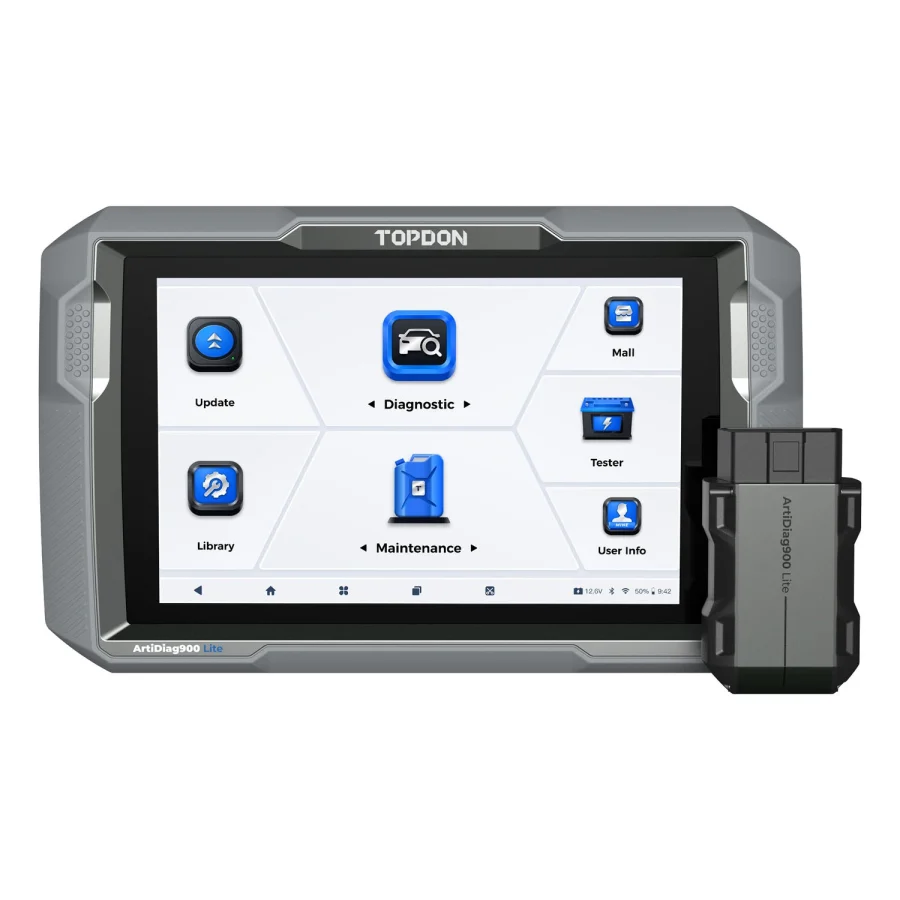
TOPDON’s US specification describes an eight-inch tablet, Bluetooth vehicle communication interface, full-system diagnostics for 60-plus vehicle brands and active tests on compatible systems. Its advertised list of eight service functions covers oil reset, brake reset, steering-angle reset, battery-management reset, ABS bleeding, ETS reset, DPF reset and airbag reset. The manufacturer’s vehicle coverage database remains the authority for whether any such operation exists for a particular car.
A significant ownership detail changed in 2026. TOPDON USA announced that, effective August 18, 2026, the ArtiDiag900 Lite receives free software updates for the supported life of the tool, replacing its previous two-year entitlement. That is encouraging for owners who expect to keep a scanner for years, but it is not a promise of support for every future vehicle or of limitless third-party online services.
Why it may fit: You primarily maintain family vehicles, want a movable wireless display, and have confirmed that your required routines appear in the exact-vehicle lookup. You value the simple service menu and dislike uncertainty over ordinary update-renewal bills.
Where it may disappoint: Its advertised eight service functions are not the same as an advanced professional tool’s larger menu. Do not infer unrestricted ECU coding, security-key programming or universal advanced adaptation from the presence of basic active tests. In some jobs, a basic service routine is not enough.
Purchase checkpoint: Verify the Lite—not ArtiDiag900BT—on the listing; check vehicle make, model, year, target module and the named function. The update policy is a US announcement, so verify the region of the offered unit. Read our TOPDON Lite vs XTOOL D7S comparison for the more technical alternatives.
2. XTOOL D7S — wired scanner for a broader maintenance menu

The XTOOL D7S is a seven-inch wired diagnostic tablet. Its published features include full-system diagnosis, bidirectional control, 39-plus named special functions, and CAN FD/DoIP communication support in the listed configuration. The current specification also says three years of upgrades are included. These facts can be useful for a home mechanic dealing with multiple makes and older and newer diagnostic platforms.
The functional count needs context: each category is an advertised capability family, not a vehicle-by-vehicle entitlement. On one vehicle the tool could show only a subset of the claimed operations. XTOOL’s own US note says its VAG Guidance feature is suspended in the United States. This does not establish that all Volkswagen/Audi coding functions are disabled; guided routines and specific coding capabilities are different, and XTOOL should confirm any essential one in writing.
Why it may fit: You prefer a physical cable, have confirmed an advanced routine not offered by a simpler scanner, and your car requires a protocol that XTOOL explicitly lists. The included upgrade period may also suit an owner expecting changing vehicle coverage over the next few years.
Where it may disappoint: A wired connection changes where the tablet can be placed. Advertising 39-plus services can overstate its usefulness to someone whose intended function is absent. Do not assume DoIP or CAN FD alone unlocks the correct diagnostic software routine. The three-year included period is not the same as unlimited free future updates.
Purchase checkpoint: Confirm the D7S model, US version, actual included vehicle interface and your specific software needs. If VAG guided functions are essential, treat the published US suspension as an active limitation until the manufacturer says otherwise. Read our XTOOL D7S US limitations guide.
3. Innova 5610 — North American handheld diagnostic choice
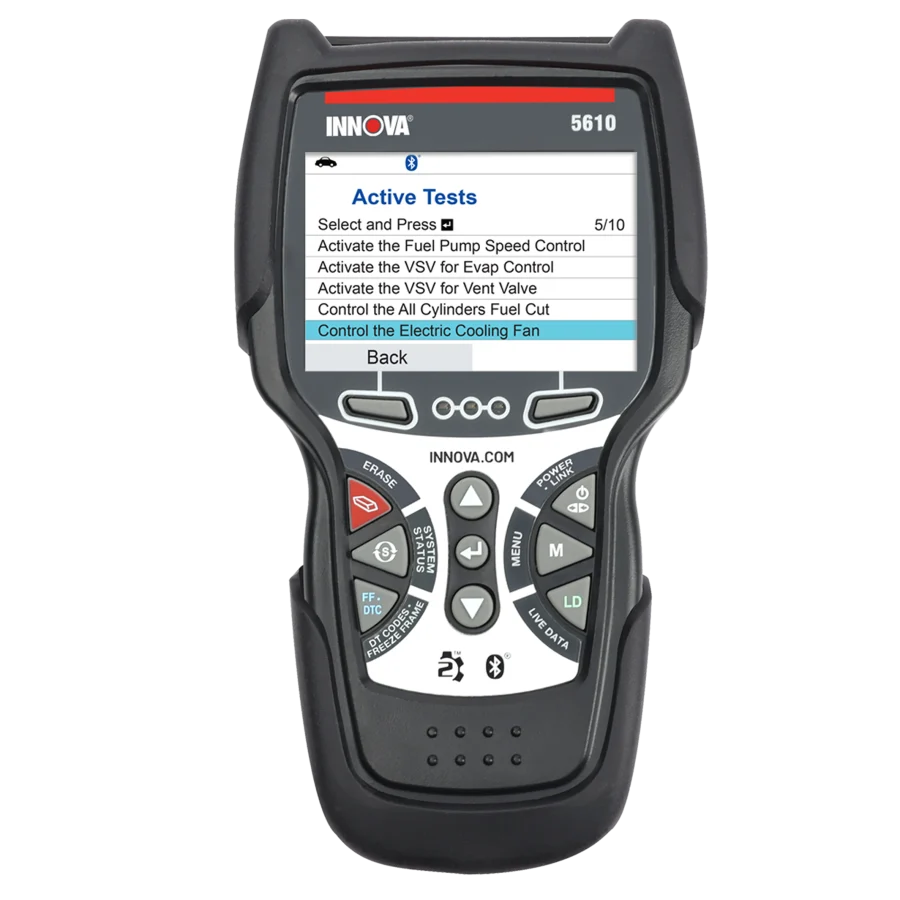
Innova positions the 5610 as a handheld scanner with full-system diagnostic access, OEM live data, active tests and a set of advanced service routines. Its own documentation names ABS bleeding, steering-angle calibration, EPB service and other functions, while repeatedly stating that availability depends on the exact car. Innova’s US-facing product page says updates are free and there are no subscriptions.
The 5610 is an attractive candidate for someone who prefers a dedicated handheld form rather than a full Android tablet, especially when the task is among the features Innova’s coverage checker confirms. It is not a universal solution: the manufacturer says the product is intended for vehicles in the United States and Canada. It also explains that some functions on newer FCA vehicles may be limited by security-gateway access. Those caveats matter more than general claims of all-system support.
Why it may fit: Your vehicles are in the supported North American market; you want active tests, approachable feature verification and no routine software subscription. The actual required operation is shown by Innova’s year/make/model/engine checker.
Where it may disappoint: Buyers outside the supported region should not assume it will function properly. Its manufacturer’s own FAQ says it does not reprogram vehicle computers or provide key-fob programming. The presence of ABS bleeding in the feature menu does not remove the need for the vehicle’s actual hydraulic procedure.
Purchase checkpoint: Use Innova’s exact-function coverage tool before ordering, record its result and clarify the hardware revision if seller descriptions differ. For ABS questions, our scanner compatibility worksheet explains what to save as evidence.
4. Autel MaxiCOM MK900BT — higher-feature wireless tablet

Autel’s US store information describes the MK900BT as an Android diagnostic tablet with wireless VCI, active tests, DoIP and CAN FD protocol support, and a broad service-function menu including ABS bleeding. That makes it worth studying for a serious DIY mechanic who maintains several vehicles or wants more room to expand beyond simple resets.
But the same model family creates naming confusion. The MK900BT should not be silently equated with the MK900, an earlier MK808-BT or the current MK808BT Pro. Search results, dealer descriptions and images can blur these distinct generations. Exact kit contents and supported functions should be checked from the actual product SKU, not an image of an Autel tablet.
Why it may fit: You have a documented need for the protocol support or specific active tests the manufacturer describes, want wireless connectivity and expect to maintain a varied group of cars. You can explain why those particular features matter for your vehicles.
Where it may disappoint: The MK900BT is not a substitute for every programming, security or module-replacement tool. A high service-function count is not exact-vehicle coverage. Manufacturer advertisements should not be translated into measured diagnostic speed or a promise of full coding capability. Update and renewal terms depend on the model and regional entitlement, so check the specific unit instead of accepting a generic Autel subscription figure.
Purchase checkpoint: Verify the US MK900BT designation, compatible VCI, exact vehicle-specific routine and current software entitlement. Our MK900BT vs MK808BT Pro comparison looks at whether the upgrade is worthwhile.
5. TOPDON ArtiDiag900BT — broader wireless service and selected coding

The ArtiDiag900BT is not the ArtiDiag900 Lite with a different label. TOPDON’s US specification names a seven-inch screen, wireless interface, 28 advanced service functions and selected ECU-coding applications. Its listed service categories include ABS bleeding, steering-angle resets and other maintenance tasks. Unlike the Lite’s current supported-lifetime update policy, TOPDON lists two years of software updates for this model.
Why it may fit: You need a particular function beyond the Lite’s eight advertised service categories, have confirmed it exists for your exact vehicle and prefer a wireless tablet. Certain manufacturer-documented coding applications can also matter, provided TOPDON verifies the target module and procedure.
Where it may disappoint: Its larger menu does not imply that every function works on every vehicle. Coding is not unrestricted ECU reprogramming. If you keep the BT for several years and choose to renew software after the included period, renewal terms may increase ownership cost. But a renewal is not necessarily required for every existing function; do not assume the scanner becomes a brick when coverage expires.
Purchase checkpoint: Record a current official renewal quote if updates are part of the purchase calculation. Verify exact code-writing requirements and gateway access. Our ArtiDiag900BT vs Lite guide compares their different ownership policies without pretending they are the same tool.
6. XTOOL D8S — consider only when the advanced workflow matters

The D8S moves above the D7S in XTOOL’s range. Its manufacturer page identifies an eight-inch wired tablet, topology mapping, bidirectional controls, 42-plus service-function categories and supported CAN FD/DoIP protocols. XTOOL lists three years of included upgrades and an array of advanced coding or module-related functions that are subject to vehicle coverage.
The topology feature can help organize complex module communication on a supported vehicle, but a home mechanic should not purchase it merely to gain a more elaborate screen. The benefit depends on the cars worked on and whether supported diagnostic maps expose meaningful information for those vehicles.
Why it may fit: You regularly diagnose multiple vehicle systems, the topology layout or a verified advanced procedure will reduce uncertainty, and the D7S or simpler scanners do not provide the functionality your jobs require.
Where it may disappoint: More features mean more things to verify. The D8S manufacturer’s US VAG Guidance suspension note should not be overlooked. Specialized coding and PMI claims require exact car, module, software version and region confirmation. A bigger tool can become an expensive code reader if you use only generic fault codes.
Purchase checkpoint: Before choosing D8S over D7S, identify at least one verified task that justifies the higher-level device. Save a current coverage response and list all adapters, software access and gateway steps required for that task.
Which scanner should you choose for your actual repair jobs?
The easiest decision framework is to rank your jobs rather than the devices. The table below is conditional guidance, not a substitute for manufacturer function-level coverage checks.
| Your priority | First models to investigate | What must be proved before ordering |
|---|---|---|
| Routine service and compatible active tests, wireless | ArtiDiag900 Lite | Exact named function in TOPDON vehicle coverage |
| Broader maintenance functions, cable acceptable | XTOOL D7S | Specific service command, US restrictions and protocol requirements |
| US/Canada handheld scanner with no update subscription | Innova 5610 | Coverage-checker result for exact year/make/model/engine |
| Wireless tablet and documented CAN FD/DoIP | Autel MK900BT | Protocol plus actual module-level software support |
| Wireless with a particular advanced TOPDON operation | ArtiDiag900BT | Exact coding/service procedure and renewal terms |
| Topology or a more specialized module workflow | XTOOL D8S | Applicable vehicle map, module action and required accessories |
If the manufacturer cannot confirm an important action, log the result as not established. Do not translate “has bidirectional control” into a guarantee of the particular service. This matters most for brake systems, immobilizers, airbags, electronic parking brakes and procedures that alter vehicle configuration.
For a handheld-versus-tablet decision, compare MK900-BT with Innova 5610. If your intended routine is specifically an idle or throttle adaptation, use the throttle-body relearn guide to check the named operation before choosing from a broader active-test menu.
Three costs to compare beyond the scanner itself
1. Software support. Separate the included update period, optional renewal and what continues working afterward. TOPDON’s 2026 supported-lifetime policy applies to specified models including the ArtiDiag900 Lite; the ArtiDiag900BT remains listed with two included years. Innova advertises free updates with no subscription for the 5610. XTOOL lists three years for D7S and D8S. For Autel MK900BT, check the offered unit’s entitlement rather than importing a figure from another Autel tablet. For details, see our scanner software update cost guide.
2. Security gateway or online service. Some repairs require access beyond ordinary offline diagnostics. Vehicle manufacturers and scanner vendors may impose registration or separate access requirements. A marketing feature list is not proof that a gateway-dependent function works today on a given US vehicle.
3. Accessories and return risk. Confirm the VCI, adapters, diagnostic lead, charging components and case supplied with the offered bundle. If a seller mixes different model generations or gives a vague warranty description, resolve that before clicking through. An honest return policy is useful, but it does not establish technical compatibility.
A three-year cost worksheet should contain: scanner purchase cost (verified at checkout), required adapters, optional update renewals, any authorized gateway charges, and any additional tools your exact job requires. Do not invent a single universal annual rate or display manually maintained Amazon prices.
For a household or workshop with several vehicles, build a task-by-vehicle list using the multi-car scanner selection guide. This helps distinguish useful extra coverage from features that do not address any vehicle you maintain.
How to verify the exact vehicle and function
- Record year, make, model, engine, market and, where required, generation or control module. The model year alone may be insufficient.
- Write down the exact operation: for example, an ABS automated bleed routine rather than simply “ABS support,” or battery registration rather than battery-voltage display.
- Check the relevant manufacturer’s function-level coverage checker or contact its support team. A compatible vehicle brand is a starting point, not a final answer.
- Ask whether the operation needs a regional software entitlement, gateway authorization, separate adapter or update subscription.
- Save a dated screenshot or written support reply and match it to the exact Amazon model revision before ordering.
- If support only says “should work,” mark the item uncertain, not confirmed. If the required function cannot be validated, reconsider the purchase.
Use our scanner compatibility checklist to record the evidence. A dated answer naming the vehicle and function is more useful than a general ranking, a service-menu count or a review of a differently named scanner.
Evidence and review method
This ranking organizes manufacturer-documented product characteristics by probable home-mechanic needs. We did not buy or operate these scanners, perform repairs, measure scan speed, audit all model-year databases or test their reliability. Claims are limited to what current manufacturer pages describe. A feature listed on a product page has model-level evidence; its availability on a particular car requires a more specific lookup. An absent claim means not established from the reviewed documents, not necessarily unsupported in all circumstances.
Where official claims conflict or refer to different generations, prefer the current US model’s page and a dated manufacturer confirmation. We will revise the guide when verified capabilities or update policies change. The editorial recommendations do not depend on commissions, stars on marketplace pages or a manufacturer’s claimed feature count.
Questions buyers ask before ordering
Does every bidirectional scan tool activate the ABS pump?
No universal conclusion follows from the word bidirectional. An active-test capability on one system does not prove access to the ABS pump or the precise procedure required for a particular vehicle. Check the named manufacturer feature for your target ABS control module and vehicle.
Is a scanner with more service functions always better?
No. Service-function numbers summarize advertised categories and may not correspond to the operations available on your car. A smaller scanner with one confirmed needed procedure can be a better purchase than a larger scanner whose list is irrelevant or unverified.
Are free lifetime updates really permanent?
TOPDON’s 2026 US announcement uses the supported life of the product. That is not the same as a perpetual promise of new vehicle support or free unrelated third-party services. Check the actual policy attached to the unit and region.
Do I need CAN FD and DoIP?
Only if your targeted vehicle and diagnostic operations require those communication arrangements. Having the protocol does not guarantee the manufacturer’s diagnostic software can perform the desired action. Our CAN FD vs DoIP guide explains the distinction.
Can these tools program replacement ECUs or keys?
Do not infer unrestricted ECU programming, module flashing, immobilizer access or key-fob programming from a generic service list. Some devices advertise limited coding or specific configuration functions, but those are not equivalent to every OEM-level programming workflow. Verify the exact task and any authorization requirements.
Can I skip compatibility research if a scanner is on Amazon?
No. Amazon availability indicates an offered product, not its suitability for your vehicle. Check the genuine model generation, US software region, supported module and required function first.
Final recommendation
For most home mechanics, the right scanner is the least complicated model that demonstrably performs their required jobs, with update terms they understand. Start by checking the TOPDON ArtiDiag900 Lite, XTOOL D7S or Innova 5610 against the exact vehicle and required operations. Move toward Autel MK900BT, TOPDON ArtiDiag900BT or XTOOL D8S when a specifically documented additional capability makes the extra complexity worthwhile.
There is no unconditional “best overall” in a category where module functions differ by car and software version. Treat the list as a shortlist for verification rather than a promise that all six can complete your repair.
Manufacturer references
Manufacturer material reviewed on October 30, 2026: TOPDON ArtiDiag900 Lite, TOPDON ArtiDiag900BT, TOPDON 2026 lifetime-update policy, XTOOL D7S, XTOOL D8S, Innova 5610, and Autel MK900BT overview. Every model-level feature remains subject to exact vehicle/region/function verification.