Best Scan Tools for Throttle Body Relearn: Models and Coverage Questions
In this guide
A scanner advertised for throttle-body relearn is useful only if it supports the operation your vehicle actually requires. A replacement electronic throttle body may need an idle or throttle-adaptation procedure, while another vehicle may use a different process or no separate scan-tool command. The procedure and its prerequisites come from the vehicle manufacturer; a generic “throttle reset” label is not enough to choose a tool.
Affiliate disclosure: As an Amazon Associate I earn from qualifying purchases.
Quick verdict: Start by checking the Innova 5610 because Innova explicitly lists throttle-body relearn among supported function families and provides a year/make/model coverage checker. The TOPDON ArtiDiag900 Lite, Autel MK900-BT, XTOOL D7S and XTOOL D8S are additional research candidates for broader service and adaptation work, but exact throttle routines must be checked for the selected car. This is not an independently tested top-five ranking.
Safety and accuracy: Do not run resets, adaptations or actuator commands based on a generic internet recipe. An electronic throttle influences engine response, and the manufacturer’s procedure may include strict prerequisites. For driveability concerns or uncertain repairs, seek qualified service. We did not test any scanner on a vehicle and have not verified live Amazon listings.
Why the terminology matters
Some product pages use throttle body relearn, throttle adaptation, idle learn, ETC reset, or TPS reset almost interchangeably. They can refer to different operations, and not every car exposes the same menu item. Before selecting hardware, translate your intended repair into the exact operation named by the vehicle service information. A generic “full systems” claim is not sufficient.
| Manufacturer wording | Possible buyer interpretation | Safer verification question |
|---|---|---|
| Throttle body relearn | Post-service learned position procedure | Does this exact vehicle expose this routine? |
| Idle speed adaptation | Idle-control learning/calibration | Is it the relevant factory step? |
| Throttle position reset | Controller’s learned or measured position | Does the scanner support this ECU’s reset? |
| Active throttle test | Commanding a component for diagnosis | Is this a test, not a relearn? |
| Generic ECU reset | Broad control-unit operation | What data or adaptation is actually affected? |
These explanations are decision aids, not definitions of a universal repair sequence.
Five scanner candidates
Innova 5610 — strongest explicitly named relearn candidate
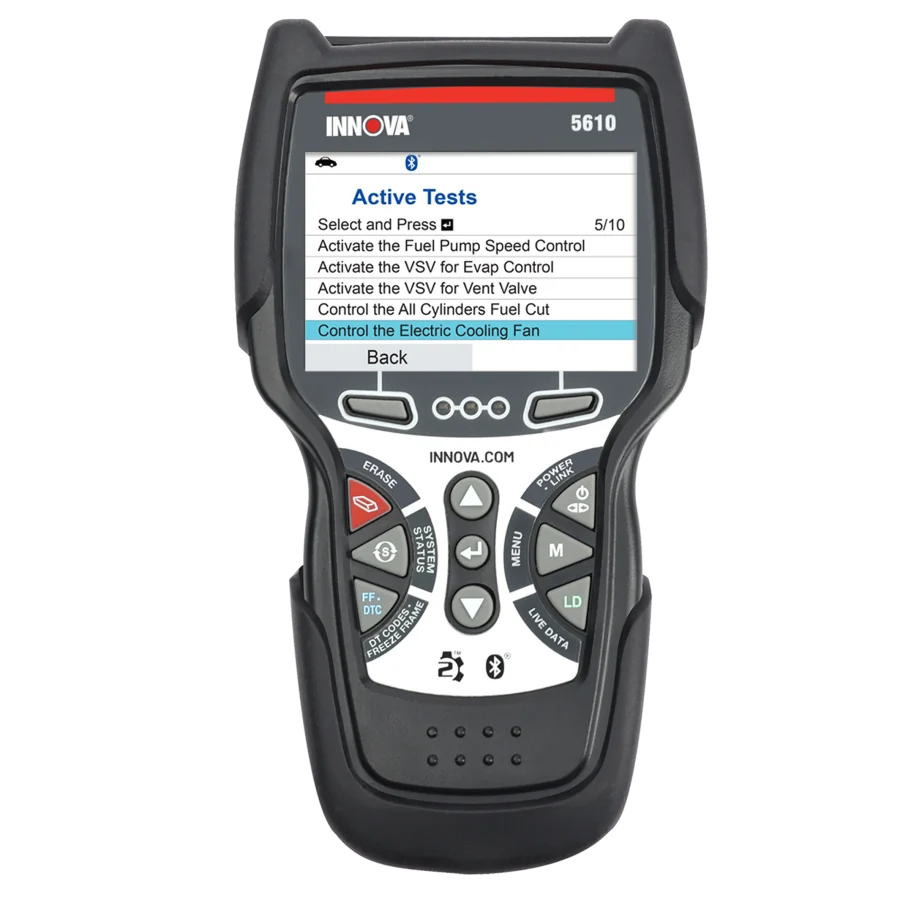
Innova’s current product materials identify Throttle Body Relearn under calibration or relearn functions and separately publish a coverage checker. That combination provides a practical buying route: enter the precise vehicle and check whether the relearn is among supported services. It is a handheld, so a buyer may avoid the expense and workflow complexity of a larger diagnostic tablet when only a small number of supported service tasks are needed.
Best for investigating: a DIY owner whose exact year/make/model displays the relevant procedure in the official Innova coverage checker. Limit: an advertised function family is not a guarantee for every engine or country version. A tool also cannot correct a hardware fault simply by resetting a learned value.
TOPDON ArtiDiag900 Lite — advertised throttle adaptation on current US page
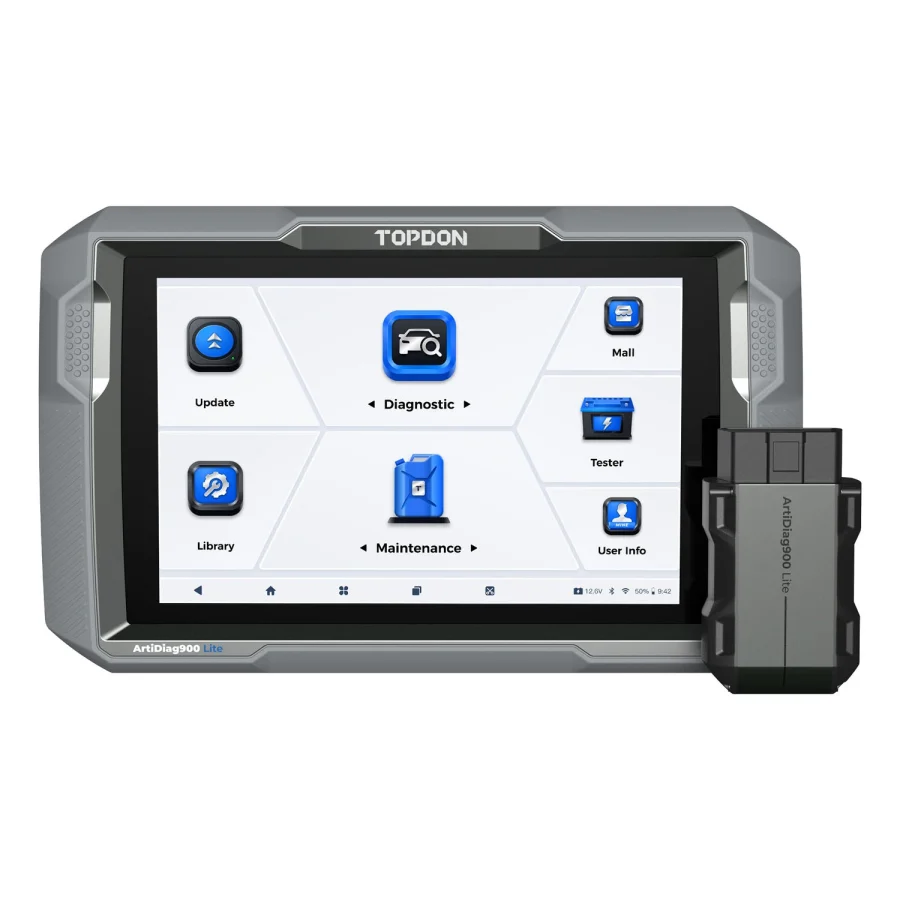
One TOPDON US product description names throttle adaptation among its eight reset-function examples, while other sections on TOPDON pages use alternative lists of eight services. Treat that inconsistency as a reason to verify the exact function in the model’s vehicle-coverage tool. The model’s wireless interface and all-system capabilities may be useful for additional diagnostics, but buying it specifically for throttle work requires stronger vehicle-specific confirmation.
Best for investigating: an owner with multiple confirmed maintenance needs and written TOPDON confirmation of the throttle procedure. Limit: vague service-menu counts should not be interpreted as a reliable throttle coverage certificate.
Autel MK900-BT — broad service tablet, exact routine unverified here

Autel documents all-system access, active tests and extensive maintenance functions on the MK900-BT. That makes it a reasonable tool to investigate for throttle-related diagnostic work, but the published model overview alone does not prove a throttle relearn operation on every engine. A buyer should ask Autel whether the service menu has the exact required operation under that vehicle’s current software.
Best for investigating: a multi-vehicle owner whose needs go beyond throttle adaptation and who has verified both the specific job and the wider toolkit. Limit: active testing and relearning are separate functions; do not infer the latter from a bidirectional claim.
XTOOL D7S — broad service categories with version caveats

XTOOL advertises numerous special functions and bidirectional diagnostics for the D7S. It is useful as a research candidate when throttle adaptation might be one task among many. The exact D7S generation, regional software, and car need to be verified. A technician should not assume a “reset” menu is suitable for a post-replacement throttle-body calibration without the factory procedure.
Best for investigating: owners needing broader scanner functionality and who can verify the requested adaptation. Limit: a large function count and multi-brand support do not establish specific engine coverage.
XTOOL D8S — only if the extra diagnostics have a purpose

The D8S adds a higher-tier feature package to the general diagnostic platform, potentially relevant when the user is troubleshooting complex multi-module problems as well as throttle control. Yet advanced topology views and diagnostics do not automatically provide the correct throttle relearn routine. Check the same exact service function as for a less expensive model.
Best for investigating: owners who expect to use its broader functions beyond throttle work. Limit: paying for an upgraded scanner does not guarantee access to a vehicle-specific adaptation that is absent from the software.
How this shortlist was selected
The candidates come from manufacturer-published service descriptions rather than claims of firsthand testing. The Innova 5610 has the clearest explicitly named throttle-body relearn evidence among the sources checked; TOPDON mentions throttle adaptation in some ArtiDiag900 Lite material, with inconsistencies in its named eight-service lists. Autel and XTOOL advertise broad service functions and active tests, which justify further coverage inquiries but do not independently prove the exact throttle relearn on a particular engine. That distinction must remain visible in both comparison tables and recommendations.
A responsible five-model shortlist is therefore five models worth checking, not five tools with verified universal throttle relearn coverage. For every reader, the first gate is the vehicle maker’s actual procedure; the second is documented exact-scanner support. We would remove a candidate from a personalized recommendation if those gates are not met, regardless of its advertising features or potential commission.
A more detailed capability matrix for shoppers
| Requirement | Innova 5610 | TOPDON ArtiDiag900 Lite | Autel MK900-BT | XTOOL D7S | XTOOL D8S |
|---|---|---|---|---|---|
| Manufacturer lists broad diagnostics | Yes | Yes | Yes | Yes | Yes |
| Throttle relearn category explicitly documented in checked material | Yes | Throttle adaptation mentioned in one US description | Exact routine not established here | Exact routine not established here | Exact routine not established here |
| Exact vehicle-specific throttle routine confirmed here | No | No | No | No | No |
| Additional all-system diagnostic use case | Documented | Documented | Documented | Documented | Documented |
A function marked “not established here” has not been confirmed by the cited model-level documentation for the particular job. It is not the same as a confirmed absence. Ask for a vehicle-specific support result that names the routine, control module and software version; a general brand-coverage answer leaves the purchase question unresolved.
Why an idle problem does not always justify a relearn tool
A rough idle, hesitation or warning light can have multiple causes. For instance, a problem may involve a genuine mechanical restriction, electrical fault, sensor signal, air leak, unrelated powertrain condition, or an adaptation that needs attention after an approved service. A scan tool may retrieve supporting data, but an arbitrary relearn command cannot be assumed to address all these situations.
It follows that the consumer’s first question should be what specific work was performed, and what does the vehicle maker prescribe next? A tool may be necessary after a repair on one vehicle and unnecessary on another. Buying a costly tablet merely because an online forum mentions “idle reset” can create expense without solving the underlying problem.
No article without controlled vehicle testing should present the mere appearance of a smooth idle after a reset as proof the reset was the correct repair. A repeatable diagnosis needs model-specific documentation and, where appropriate, professional inspection.
Three common owner situations
After replacement of a throttle-related component
The owner has a work order or repair instruction indicating a specific relearn is required. This is the strongest buying scenario because the exact intended operation can be named. Record the engine variant, control module and procedure description, then confirm a scan-tool option using the manufacturer’s coverage database. A verified Innova coverage result can be useful; if unavailable, ask TOPDON, Autel or XTOOL for a specific answer. Do not substitute a generic “ETC reset” menu for a procedure named differently by the vehicle maker.
After battery disconnection or a period of irregular idle
Some readers assume they must purchase a scanner because the idle changed after power was lost. That assumption may be premature. The vehicle maker may describe a specific adaptation or normal relearning condition, and a diagnostic fault may also exist. Before buying equipment, read the relevant service instructions and observe any warning codes or symptoms safely. An aftermarket scanner should be selected only if the prescribed task requires it or if supported diagnostic data would genuinely help.
A small repair shop with many brands
A shop may face numerous electronic-throttle systems, and an all-system tablet could be valuable for many independent tasks. The actual purchase case should be based on the most frequently serviced vehicles and exact functions, with records of current software, access permissions, and updates. A claim of supporting thousands of vehicle models does not establish the same throttle adaptation function on each.
For a mixed fleet, create a worksheet with model years and procedure names, then request documented responses from at least two tool makers. If neither confirms coverage, an OEM solution or specialist service may be the proper route rather than forcing an aftermarket device into an unsupported job.
Commercial decision: when a tool upgrade is justified
The Innova 5610 and higher-tier tablet products can occupy different purchase segments, but price alone should not settle the decision. A handheld may offer the exact needed relearn and adequate code access for one car. A more expensive tablet may add value through report export, other service routines, modern protocols, or supported multi-vehicle diagnostics. Those extra functions should have identifiable planned use before the higher price can be defended.
A useful worksheet records the actual model number, confirmed throttle routine, compatible vehicle, included interface, software term and current checkout price. Add any update, gateway or adapter needed for the operation. Compare those details with the tool’s other likely uses in your garage. Keep the model and selected retailer variation consistent throughout the comparison, including the warranty and return terms that apply to the offered kit.
Software renewals require the same care. If the relearn works with installed software on a stable vehicle, an owner might not need constant updates. A shop adding new model years may need them. Neither situation supports the blanket claim that software renewals are always useless or always mandatory.
What does “active test” actually add here?
Some advanced scan tools can send commands to selected vehicle actuators as part of diagnostics. That capability is distinct from asking the vehicle to perform a relearn or save an adaptation. A tool may support both on some vehicles, only one on others, or neither on a particular module. A consumer should not assume the presence of active testing authorizes a throttle calibration.
An electronically controlled throttle can move as part of a diagnostic or adaptation sequence. A scan menu is therefore not a substitute for the vehicle’s current service information. If the documented process requires conditions or equipment you cannot safely provide, use a qualified repair professional instead of improvising an actuator command or a generic pedal-and-ignition sequence.
Questions to ask support before spending money
Tell the tool maker the exact US-market year, make, model, engine code if available, and desired manufacturer-named procedure. Ask whether the precise scanner SKU implements that procedure in the current US software, which subscription is required, whether online authorization applies, and which original manual section describes it. If an agent responds only with the word “throttle,” ask whether they mean live-data monitoring, an active test, a reset, or a completed relearn. Save a dated copy of the answer for your records.
How to choose for one specific vehicle
Obtain the official vehicle service instruction first. Record the model year, engine variant, market and whether the task follows a throttle-body replacement, disconnection or another fault. Find the operation name used by the manufacturer. Then check the exact scan-tool model in the maker’s function coverage tool and ask for a written answer if the list is vague. Finally confirm any software update, gateway access or accessory needed before buying.
Avoid broad claims such as “all post-1996 vehicles can be relearned with any professional scanner.” A vehicle that supports standard OBD-II data may still have a different throttle learning method, including one that doesn’t use the same aftermarket service command.
Common mistakes that waste money
Buying an expensive scanner instead of diagnosing the vehicle: a persistent issue may be mechanical, electrical, a sensor problem or related to prior service. A relearn is not a general repair.
Confusing a reset with actuator testing: the ability to move or command an actuator in a diagnostic test doesn’t prove the software supports the intended learned-value operation.
Following an unrelated model’s procedure: engine family, model year and ECU calibration matter. Don’t substitute an online “universal” button sequence for the correct manufacturer instructions.
Using an ambiguous product listing: Similar names can describe different generations or regional kits. Confirm the exact model identifier, included connection hardware and software entitlement, then match them to the manufacturer’s coverage answer before ordering.
Before-and-after evidence without inventing testing
After an appropriate technician has diagnosed and serviced the vehicle, the reader may want a factual record of the diagnostic process. Useful records can include the specific DTCs retrieved, the requested factory procedure, the named scanner function, relevant vehicle configuration, and the confirmation steps actually prescribed by the manufacturer. What does not belong in such a record is an invented before-and-after RPM number, an unverified claim of improved acceleration, or a conclusion that a reset restored normal performance without supporting observations.
This matters to the comparison because some scanners make it easier to save diagnostic reports while others emphasize supported service menus. A home owner who mainly needs one documented adaptation may prefer a simpler tool; a repair-focused owner may need report export and broader module access. Either recommendation should be tied to a real workflow. Our site has not conducted that vehicle test and must not imply otherwise.
How to handle contradictory product documentation
The TOPDON ArtiDiag900 Lite material demonstrates why a buyer should read further than a shopping card: official pages do not always describe identical service-menu categories in the same way. If one section says “throttle adaptation” and another lists a different named eight-function set, we should record the discrepancy, ask the current US support team for a function-by-vehicle answer, and avoid stating an unqualified yes. In a buying guide, that is a hold rather than an opportunity to pick the most attractive marketing claim.
The same distinction applies to Autel and XTOOL model revisions. A product-family page may describe a capability that is absent from a particular regional software package or hardware generation. Ask for an exact-model source or a written support answer tied to your vehicle. Until that evidence is available, treat the requested operation as unconfirmed rather than assuming that the family description establishes compatibility.
Suggested buyer worksheet
| Field | What to write | Why it changes the decision |
|---|---|---|
| Vehicle identification | Year, model, engine and market | Determines applicable routine |
| Required manufacturer procedure | Exact service-manual wording | Distinguishes relearn from reset |
| Scan tool model | Exact SKU and region | Avoids generation confusion |
| Evidence | Coverage checker result or dated support reply | Substantiates the recommendation |
| Prerequisites | Official service information reference | Prevents speculative commands |
| Ongoing cost | Included updates, any required renewal | Shows actual ownership cost |
| Other uses | Named functions for other vehicles | Justifies larger scanner investment |
A record like this turns a vague query—“best scanner for throttle”—into a specific, answerable buying decision. It also provides a reason to not recommend an expensive scanner when another approach is more suitable.
After purchase: verify the tool before relying on it
A new scanner’s first task is not immediately commanding an adaptation. Check that the product identity matches the order, the genuine VCI or cable is included, the seller’s warranty terms are clear, the intended car is recognized, and the diagnostic function appears as the manufacturer promised. Preserve the setup documentation and official support case. If the tool lacks the confirmed function, pursue legitimate support or return processes rather than attempting an undocumented workaround on the vehicle.
Match the retailer’s selected variation to the scanner model that the manufacturer confirmed. Similar product names can refer to different generations, regional software or accessory packages. Record the required interface and update entitlement with the support answer so that a misleading listing title does not undo an otherwise careful compatibility check.
Questions buyers commonly ask
Can I do throttle-body relearn without a scanner?
Some vehicles may have manufacturer-defined procedures that don’t require an aftermarket scan tablet; others do. Use the specific service information for the exact vehicle rather than a universal answer.
Will clearing check-engine codes relearn the throttle?
Not necessarily. Clearing fault codes, resetting adaptations and completing a relearn are distinct operations. Don’t erase diagnostic evidence without a reason.
Is a bidirectional scanner always capable of throttle relearn?
No. Bidirectional active tests and learned-value adaptations are separate capabilities, each requiring appropriate vehicle support.
Should I buy the cheapest scanner advertising “ETC reset”?
Only if its manufacturer can verify the exact function for your car, including software and regional variant. A menu label alone is insufficient.
Make the final choice from a dated confirmation of the vehicle and named routine. A device that communicates with the engine ECU may still lack the adaptation you need. If support cannot establish that operation, compare professional service with further tool research; buying a broader menu of unconfirmed functions does not resolve the original problem.
Final recommendation
The Innova 5610 is the clearest starting point for documented throttle-body relearn research, because both the category and a vehicle coverage method are publicly available. Investigate the TOPDON, Autel and XTOOL alternatives only when they have additional functions you need and the specific relearn is independently confirmed for your vehicle.