Best Bluetooth OBD2 Adapters for iPhone and Android: 6 Options Compared

In this guide
A Bluetooth OBD2 adapter can be one of the least expensive ways to find out why a check-engine light is illuminated. It can also be a frustrating purchase if the phone cannot pair with it, the intended app does not support the adapter, or a promised “all-system scan” turns out to mean basic emissions-related data. This guide compares six distinct products, with the software ecosystem—not a vague claims of “universal compatibility”—at the center of the decision.
Affiliate disclosure: As an Amazon Associate I earn from qualifying purchases.
Quick verdict: Investigate OBDLink MX+ when you want a flexible iPhone/Android adapter with a substantial third-party app ecosystem and documented Ford/GM network support. Choose BlueDriver Pro if you prefer its own guided app and the supported vehicle’s enhanced diagnostics. Consider OBDLink CX for supported BMW/BimmerCode use, Veepeak OBDCheck BLE+ for affordable app-driven standard OBD2 data, Carista EVO for supported Carista functions, and OBDLink LX only if your host is Android or Windows. None is a replacement for a professional tablet in every service operation.
This is a source-based comparison, not a hands-on speed, durability, or signal test. Confirm the exact official model number, seller and app requirements before ordering; prices and stock can change.
Comparison at a glance
| Device | Phone support documented | Best reason to investigate | Essential limitation or cost question |
|---|---|---|---|
| OBDLink MX+ | iOS, Android; Windows also | Broader third-party software choice, Ford/GM extended networks | Advanced functions depend on vehicle/app |
| BlueDriver Pro | iOS, Android | Integrated scan reports and vehicle-specific enhanced data | Functions outside supported app/vehicles require verification |
| OBDLink CX | iOS, Android | BimmerCode-oriented BLE ecosystem | Not a general replacement for MX+ on older Ford/GM/FCA vehicles |
| Veepeak OBDCheck BLE+ | iOS, Android | Standard codes and data through compatible apps | Manufacturer excludes service resets and relearns |
| Carista EVO | iOS, Android | Carista Pro functions on supported makes | Subscription and vehicle coverage are separate purchase decisions |
| OBDLink LX | Android; Windows | Android/Windows app setup without iOS requirement | Not compatible with iOS per OBDLink |
Do not use this table as a vehicle coverage guarantee. A US-market vehicle may expose generic emissions codes while withholding ABS, airbag, transmission, or manufacturer body-module information from the chosen app.
1. OBDLink MX+ — broadest app-oriented option in this group

OBDLink publishes MX+ compatibility with iOS, Android and Windows; it also specifically documents Ford MS-CAN and GM SW-CAN capability, unlike some limited-protocol BLE dongles. Its app directory lists OBD Fusion, Car Scanner, FORScan Lite and other programs, but availability of a supported app is not proof that every feature will work on every car. MX+ includes OEM-specific data add-ons for certain makes in OBDLink’s application, and official support documentation says the exact enhanced diagnostics vary by make and vehicle year.
The strongest reason to choose MX+ is flexibility. A reader who wants a basic engine-code tool today, but expects to use another compatible app later, can investigate one established hardware platform. The weak point is that flexibility makes evaluation more complicated. Licensing and functionality belong partly to the third-party app, not only to the adapter. Check both companies’ support pages before paying.
Best fit: A buyer who values app choice, compatible iPhone use, and documented additional networks. Not proven: OEM programming, every ABS function, or a particular active test. The maker’s broad protocol claim does not override a vehicle-specific feature matrix. See the OBDLink EX vs MX+ FORScan comparison if Windows FORScan is your main purpose.
2. BlueDriver Pro — guided, integrated app workflow

BlueDriver promotes an integrated mobile-app experience with fault-code lookup, live data, Mode 6 test results and enhanced system codes for supported models. Its official website provides a vehicle compatibility checker that considers the country where the car was originally sold, the exact engine and model year. That last detail matters: “works with Toyota” is not precise enough to justify an ABS or transmission recommendation.
BlueDriver says the supported service has no subscription or add-on charge. That is useful if you want a tightly defined product/app bundle and do not plan to purchase multiple diagnostic apps. However, examine the exact Pro versus Pro Next-Gen product identity before ordering: the brand displays multiple versions. Do not infer that a new version supports all the same functions or has the same warranty as an older listing.
Best fit: Owners who want a dedicated phone-based tool and vehicle-specific repair context. Limit: Do not assume bidirectional actuator commands or sophisticated service coding merely from “all systems” marketing language. Independently verify access to the target module before purchasing.
For a closer decision between the integrated BlueDriver app and a more flexible adapter ecosystem, read OBDLink MX+ versus BlueDriver Pro.
3. OBDLink CX — BMW-specific app orientation

OBDLink markets CX primarily for the BimmerCode ecosystem and confirms iOS/Android BLE pairing. Its own adapter comparison warns about limitations on certain earlier Ford, GM and FCA vehicles. Those restrictions make it a poor universal recommendation when you have a mixed set of older vehicles. In a compatible BMW or Mini, however, choosing an adapter with published BimmerCode support can be more rational than guessing which inexpensive generic Bluetooth device might communicate reliably.
The separate BimmerCode app is part of the buying decision. Verify exact chassis generation, app edition, supported commands and whether a coding task has consequences for safety or vehicle warranties. Access to coding menus is not approval to alter a safety module.
Best fit: Supported BMW/Mini applications where the app developer lists CX as compatible. Limit: The CX’s BLE connection should not be sold as equivalent to MX+ across all old protocols and third-party programs.
4. Veepeak OBDCheck BLE+ — flexible general-purpose data reader

Veepeak documents BLE support for iOS, with direct pairing inside the compatible app rather than through the ordinary iPhone Bluetooth settings. On Android the behavior may use a different Bluetooth profile. Veepeak publishes a list of compatible applications including OBD Fusion and Car Scanner; some enhanced functions depend on optional paid app features and the exact vehicle.
One of the most important details is what the manufacturer does not promise. Its product documentation excludes oil reset, electronic parking brake service, and general relearn/adaptation functions. This prevents the common mistake of buying a small OBD2 dongle for a workshop job that requires an advanced tablet or OEM software. Its standard live data and emissions-readiness use may still be perfectly adequate for the right owner.
Best fit: Readers whose goal is generic emissions codes, supported data logging or dashboard viewing through a selected app. Limit: It is not a safe default for ABS service, ECU coding or immobilizer work.
5. Carista EVO — an app-linked customization platform
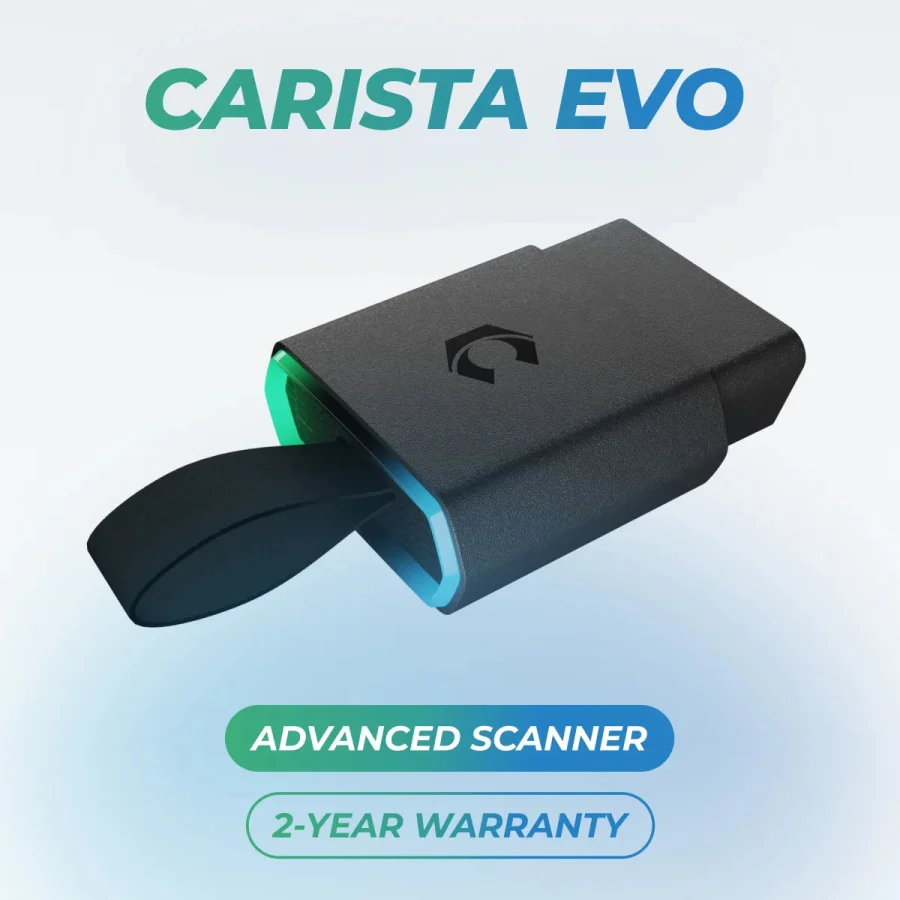
Carista markets EVO as the preferred adapter for its Carista App Pro, supporting iOS and Android. Its FAQ distinguishes the EVO from the older Carista OBD scanner and confirms that supported customizations, service features and brands differ by vehicle and by which adapter you use. The Carista app can have free and paid tiers; access to the scanner hardware alone does not establish entitlement to premium menus.
For a supported model, the integrated app and adapter pairing may provide a clear path to specialized functions. For a general owner who only wants generic DTCs once a year, an ongoing subscription may be unnecessary. Compare a three-year cost—including app access—rather than only the dongle purchase. Also be wary of claims that SFD or other manufacturer gateway functions apply to every model year.
Best fit: Buyers who confirm that one specific Carista Pro feature is available for their exact car. Limit: An app subscription and the correct model/market support are not optional research steps.
6. OBDLink LX — an Android and Windows alternative

LX is well established in OBDLink’s catalog for Android and Windows. It is not an iPhone option under the manufacturer’s published adapter comparison. This simple platform limitation makes it easy to eliminate for some readers, even if it is offered at an attractive price by a third-party seller. LX also lacks the full Ford MS-CAN / GM SW-CAN combination specified for MX+.
For Android owners who want the OBDLink app and compatible third-party programs, LX can be worth investigating. But buying LX for an iPhone because the listing says “Bluetooth” is an avoidable mistake. Confirm that the app author lists LX specifically, not simply “ELM327-compatible hardware.”
Best fit: Android or Windows users with a verified compatible application. Limit: No iOS support, and its extra manufacturer-network functions differ from MX+.
How to choose by task rather than by star rating
Begin with the exact output you want. If you want to record generic freeze-frame and emissions readiness, a supported small adapter may suffice. If you need BMW coding, the relevant app/software entitlement matters more than a high-level Bluetooth specification. If the requested task involves an ABS hydraulic module, EPB actuators, immobilizer security or ECU programming, do not assume any of these compact adapters can perform it simply because they communicate with an OBD2 port.
Next identify the phone and app. Bluetooth Classic and Bluetooth Low Energy are not interchangeable in every app and operating system. Some iOS devices require BLE devices to connect inside the app rather than through iOS system settings; that does not mean the device is broken. Avoid ordering until the app developer lists the exact adapter and OS version as compatible.
Then verify enhanced-data coverage. The central diagnostic problem is not that the scanner cannot read any codes; it is that a buyer may need a specific module absent from generic OBD2 support. Consult our compatibility checklist and why engine codes may appear while ABS modules remain inaccessible.
Finally calculate the ownership cost. A paid app, manufacturer-brand add-on, cloud service or extra module license can change the economics. Some vendors include useful functionality at no recurring charge, while others tie advanced features to their app subscription. A product called “subscription-free” is only a good fit if it actually performs the desired task.
Buying checklist for an exact vehicle
| Verify | Record before buying |
|---|---|
| Vehicle | Year, make, model, engine, country originally sold |
| Main task | Generic DTC, enhanced module, data logging, coding or service routine |
| Phone | iPhone/Android model and OS version |
| Software | Exact app, version, subscription and supported adapters |
| Vehicle network | Standard OBD2, MS-CAN, SW-CAN or another required protocol |
| Enhanced functions | Source documenting the specific function on your vehicle |
| Ownership | Adapter price, paid app tier, warranty and update terms |
| Merchant | Exact generation/model, authorized distribution and return conditions |
When a seller lists multiple versions in one Amazon variation group, match the exact named version to the official specification page. If you see a similarly shaped adapter with an unfamiliar brand and no support documentation, do not treat it as equivalent. Check the selected adapter, seller and app requirements at checkout.
Mistakes that lead to poor purchases
A phone-compatible adapter is not necessarily an all-module scanner. A standard OBD2 reader may reveal emissions codes but not the specific ABS controller you need. Similarly, saying an app can show a vehicle’s battery status does not automatically establish EV high-voltage battery health reporting.
A list of 20 compatible apps is also not 20 free apps. Some tools require a separate paid upgrade or account. Read the fine print for the software, not just the adapter box.
Finally, do not leave an adapter installed merely because it fits flush. Evaluate the maker’s sleep behavior, access control, vehicle usage and battery condition. Veepeak, for example, recommends removal when a vehicle will be unused for a longer period. Never leave a device where it interferes with footwell operation or driving.
How to test an adapter’s fit before paying for enhanced apps
A sensible research exercise begins before purchase. Pick the exact vehicle and write down three tasks: for example, read a stored engine code, display coolant temperature, and access an ABS fault. Visit the adapter maker’s vehicle coverage resource for each task, then the app maker’s compatibility list. If the adapter documentation proves the first two but says nothing about ABS, label the third as unverified. Do not promote the device as an all-system reader simply because another product from the same brand supports an ABS menu.
For third-party apps, check whether the supported adapter is named precisely. “Works with ELM327” can describe a broad family of devices with inconsistent implementations, especially if it is an unbranded marketplace listing. A listed app’s compatibility with MX+ does not automatically make it compatible with CX, LX or an older discontinued OBDLink MX. Likewise, connecting to a BMW with BimmerCode does not establish compatibility with every vehicle-brand feature of the OBDLink app. Keep hardware certification, third-party app compatibility and vehicle feature availability in three separate columns.
Phone operating systems require a similar distinction. If a manufacturer says pairing occurs inside the iOS app, try that supported workflow rather than concluding the adapter is defective because it does not pair in Bluetooth Settings. Firmware updates sometimes require the maker’s own app rather than a third-party app. OBDLink’s 2026 support instructions provide different firmware-update routes for Android/iOS and Windows models; buying a used unit without verifying firmware and app support can undermine an otherwise attractive price.
Compare a realistic three-year ownership scenario
Imagine two buyers using the same iPhone. Buyer A wants ordinary engine codes and live readings twice a year; Buyer B wants a supported BMW customisation function every few months. A general reader paired to a free or already-owned app may fully satisfy A. B may need a specific adapter-app pairing and paid software. Both could choose a “Bluetooth OBD2 scanner,” yet the relevant costs and feature requirements differ. The correct comparison is hardware price + app costs + applicable enhanced-data packages + any renewal, not “one adapter costs less than another.”
The device may also need to stay useful as phones and vehicle software change. Check current OS requirements and whether the manufacturer maintains a support knowledge base, not only the number of older reviews. A company with clear instructions for supported apps and firmware can provide evidence for troubleshooting later. This does not prove longevity, but it reduces uncertainty compared with an anonymous adapter that has no documented updater or manufacturer help channel.
When to choose a tablet instead
If you need to run an EPB service mode, register a battery, bleed an ABS module, or command an actuator, compare those tasks with our bidirectional scan-tool buying guide. Some phone-app ecosystems offer advanced modules and functions, but they are not automatically substitutes for a manufacturer-approved professional interface. Do not assume a tablet will perform the job either; the exact vehicle and supported function remain decisive.
The question is not whether adapters are “real scanners.” They are valid tools for a defined scope. The mistake is purchasing an adapter whose communications and software capabilities do not align with the repair. A truthful buying guide should recommend the cheaper device where it suffices and disclose when a more capable system is required.
A final app-and-adapter verification matrix
| Buyer profile | Starting option | What must be proven first |
|---|---|---|
| iPhone and general engine codes | MX+, BlueDriver, Veepeak BLE+ | App supports phone OS and vehicle’s OBD2 protocols |
| BMW owner with BimmerCode goal | OBDLink CX | Exact chassis, app function and software entitlement |
| Android-only buyer | LX or one of the cross-platform devices | Required app and controller data support |
| Ford owner wanting Windows FORScan | Usually investigate OBDLink EX instead | Windows software edition and Ford network coverage |
| Carista enthusiast | Carista EVO | Exact service/customization item and paid-app terms |
| Multiple vehicle makes | MX+ or BlueDriver after coverage checks | Function support per vehicle, not just brand names |
Do not use these pairings as guaranteed endorsements for an entire vehicle family. They are research starting points. Each buyer should be able to show the manufacturer support page that justifies the product being considered. Without that evidence, vehicle-specific suitability remains unconfirmed.
When future vehicle ownership changes the decision
If you anticipate replacing your car soon, prioritize standard protocol breadth, supported apps and ongoing firmware support over a single model-specific enhancement that may not transfer to the next vehicle. This is especially relevant for buyers considering a specialized BMW app ecosystem versus a general-purpose scanner. However, planning for a future car is not justification to buy an expensive feature bundle now; unknown future coverage is still unknown. Choose the tool that works for today’s documented use and treat future compatibility as a bonus rather than a promise.
FAQs
Which one should an iPhone owner choose?
Shortlist MX+, CX, BlueDriver Pro, Veepeak BLE+ or Carista EVO based on the desired app and vehicle. Exclude LX if iOS support is required under the current official OBDLink listing.
Can a Bluetooth adapter perform an ABS bleed?
Not as a general rule. An ABS bleeding routine requires an appropriate tool, controller access and the exact service process. Standard emissions-data support is not proof of that capability. See the ABS scan-tool guide.
Is OBDLink MX+ better than BlueDriver?
They solve overlapping but different software problems. MX+ offers broader supported-app choice and certain network capabilities; BlueDriver provides its integrated guided platform. The winning option is the one with confirmed coverage for your car and task.
Can a cheap dongle damage my car?
A well-designed compatible interface used only for reading ordinary data is different from an unreliable device used for high-risk programming. Avoid speculative coding and use authorized repair documentation; counterfeit or faulty adapters add risks.
Final recommendation
Choose the software ecosystem first, then the adapter. MX+ is the strongest general starting point when multiple apps or extra supported networks are important. BlueDriver is a sensible alternative for owners who prefer its included app and documented enhanced diagnostics. Choose CX for specific supported BMW workflows, Veepeak for standard data, Carista EVO for confirmed Carista Pro features, and LX for Android/Windows-only setups. All six are conditional recommendations; the correct tool is the one that matches a documented vehicle/task combination.