Best Diagnostic Scanners for Used-Car Inspections in 2026
In this guide
An OBD2 scanner can be a useful part of evaluating a used car, but it cannot tell you that a car is mechanically sound. A tool may report no stored emissions codes while the vehicle still has collision damage, oil leaks, worn suspension parts, recently cleared monitors, or an intermittent fault that has not yet triggered a warning. The most useful scanner is therefore not the one that promises to “inspect everything”—it is the one that provides understandable evidence without claiming more certainty than the data allows.
Affiliate disclosure: As an Amazon Associate I earn from qualifying purchases.
Quick verdict: For a compact North American handheld with enhanced systems and manufacturer-supported readiness and live-data functions, investigate the Innova 5610. For more extensive all-system inspection and saved reporting, consider the Autel MK900-BT or XTOOL D8S, provided current vehicle coverage checks are positive. The TOPDON ArtiDiag900 Lite, TOPDON ArtiDiag900BT, and XTOOL D7S are alternatives for buyers who want diagnostic capability for ongoing ownership as well as occasional purchase checks. For a one-time used-car purchase, a professional independent inspection may be a better investment than a $300-plus scanner.
We have not field-tested these products or tested used cars. This is a manufacturer-documented purchase guide. The Federal Trade Commission advises arranging an independent mechanic’s inspection even when a seller offers a history report or the car is described as certified. It is essential to treat scan data as supplementary evidence, not a replacement for that process.
Why the question is different from “best bidirectional scanner”
A scan tool for routine driveway repair may be evaluated by whether it can command a fan, initiate a supported EPB routine or register a battery replacement. For a used-car inspection, the requirements are often different: read current and stored diagnostic trouble codes without changing the car, view the malfunction indicator lamp status, inspect emissions readiness, check freeze-frame information where available, and—if justified—review additional modules such as ABS, airbags and transmission. The ability to save or export a report is valuable because it lets a mechanic or buyer compare findings later.
A buyer should avoid altering another person’s vehicle during inspection. Do not clear codes, reset readiness, initiate active tests, perform service routines or change adaptations during an exploratory pre-purchase scan. Those actions may erase useful evidence or create new risks. With the seller’s permission, limit the process to appropriate read-only operations, and ask a professional when there is uncertainty.
Six scanner candidates compared
| Tool | Why it’s on the shortlist | Documented features relevant to inspection | Critical caveat |
|---|---|---|---|
| Innova 5610 | US/Canada handheld | I/M readiness, freeze frame, all-system scan, enhanced live data | Market restriction and vehicle-specific features |
| Autel MK900-BT | Wireless diagnostic tablet | Full-system codes, pre/post reports, live data, AutoVIN | Features vary by vehicle; software entitlement needs review |
| XTOOL D8S | More advanced wired tablet | All-system scanning, topology for supported vehicles, data recording/export | Topology isn’t proof of vehicle condition |
| TOPDON ArtiDiag900 Lite | Wireless multipurpose tool | Full-system diagnosis, data stream and codes | Fewer service categories, but service functions aren’t the inspection priority |
| TOPDON ArtiDiag900BT | Broader wireless diagnostics | Full-system code access and bidirectional platform | Update fees and function coverage may matter if kept long-term |
| XTOOL D7S | Wired diagnostics with logging | Full-system scans, freeze-frame and graph recording | US-specific guided-function limitations; not an inspection certificate |
The six models are included because the manufacturers advertise relevant diagnostic categories. We have not measured which scanner finds more real faults. Do not interpret this table as evidence that every model can scan every module on every car.
1. Innova 5610 — a handheld with inspection-relevant features
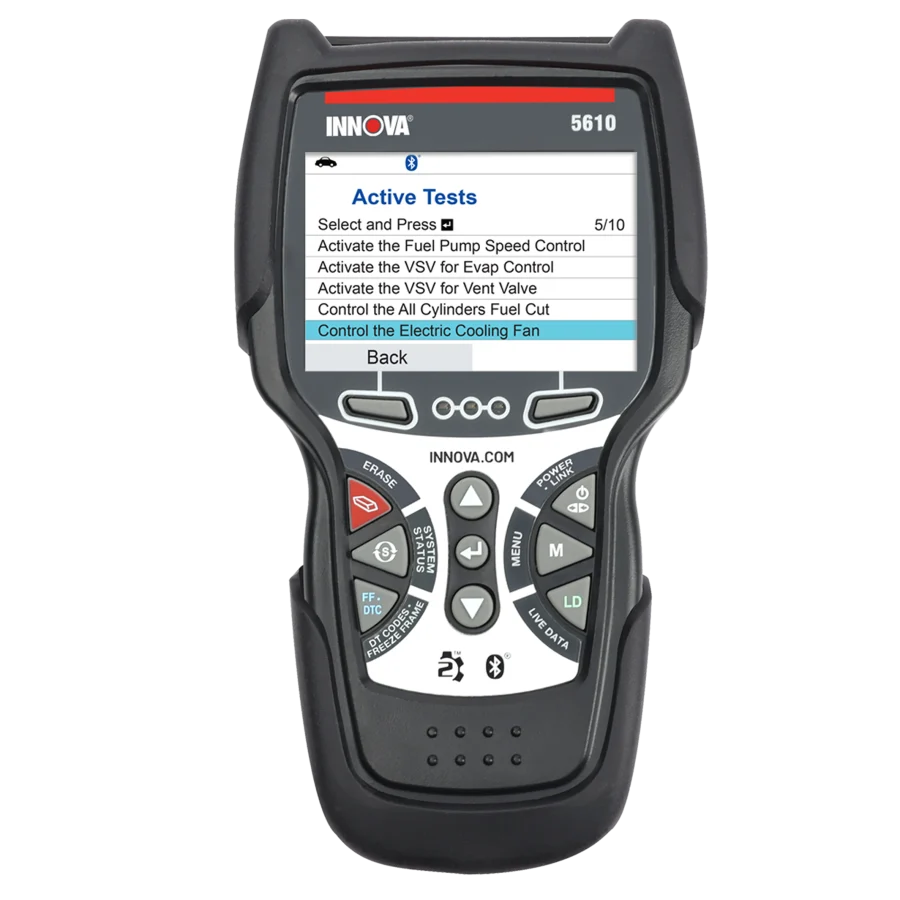
Innova’s official 5610 product information includes I/M monitor status, fault-code retrieval, freeze-frame information, all-module scanning and live data, including enhanced ABS, SRS and transmission categories where supported. These are the kinds of features a pre-purchase evaluator can use to gather evidence before deciding whether a vehicle requires specialist attention.
A particular advantage of Innova’s product information is its vehicle and feature availability checker. This directs a buyer away from broad claims such as “works on all cars” and toward supported functions for an exact year, make, model and engine. Innova also states that the 5610 is intended for the US and Canada and that availability can vary by vehicle. Check the product’s regional and gateway details before purchase.
Best use: Someone who periodically checks North American vehicles and values a compact interface for basic and enhanced diagnostic evidence. If the main goal is buying one car, first compare the tool purchase cost with the fee for an independent pre-purchase inspection.
Limitation: Even a scanner with all-module access cannot uncover every mechanical or structural defect. A clean stored-code report should never be presented as a safety or condition certificate.
2. Autel MaxiCOM MK900-BT — for detailed reports and post-purchase repair work

Autel’s MK900-BT documentation advertises AutoVIN, all-system diagnostic capabilities, live data and pre/post scan reporting. Those features are relevant when a buyer wants a saved record of what modules reported at a particular time. Its eight-inch wireless tablet format can also help when presenting findings to another person, although we have not assessed usability in the field.
The pre/post feature should be understood correctly. It compares diagnostic information at different times; it does not determine whether a car has a bent chassis, an unreported collision, a coolant leak or a subtle transmission problem. For a prospective buyer, recording the initial scan and noting when and under what operating conditions it was taken is often more useful than pressing buttons to attempt repairs before purchase.
Best use: A serious home mechanic who will use the unit after purchasing the car for broader diagnostics and maintenance. Confirm current update policy, authenticity and vehicle-specific modules before making an expensive purchase.
Limitation: Manufacturer support for CAN FD and DoIP doesn’t establish full diagnostic access to every protected system or guarantee that the device can read accident history.
3. XTOOL D8S — for broader modules, topology and exportable data

XTOOL’s D8S page advertises all-system diagnostics, topology mapping, live data, recording and CSV export. A supported topology view may help a knowledgeable user organize modules and notice that expected systems are not communicating. Data export can also help keep a dated record for discussion with an independent technician.
Be cautious about interpretation. An unresponsive module could reflect unsupported communication, an inactive system, a low-voltage condition, security restrictions, a wiring fault or an actual module issue. A diagram alone does not distinguish these possibilities. Nor does the ability to graph data imply the car was driven under appropriate conditions to test the system. Some problems only appear when warm, under load or intermittently.
Best use: A buyer who also owns and maintains several vehicles and will use data logging and advanced diagnostics after the transaction. For one used-car inspection, the additional complexity and cost may be unnecessary.
4. TOPDON ArtiDiag900 Lite — for straightforward wireless all-system reading
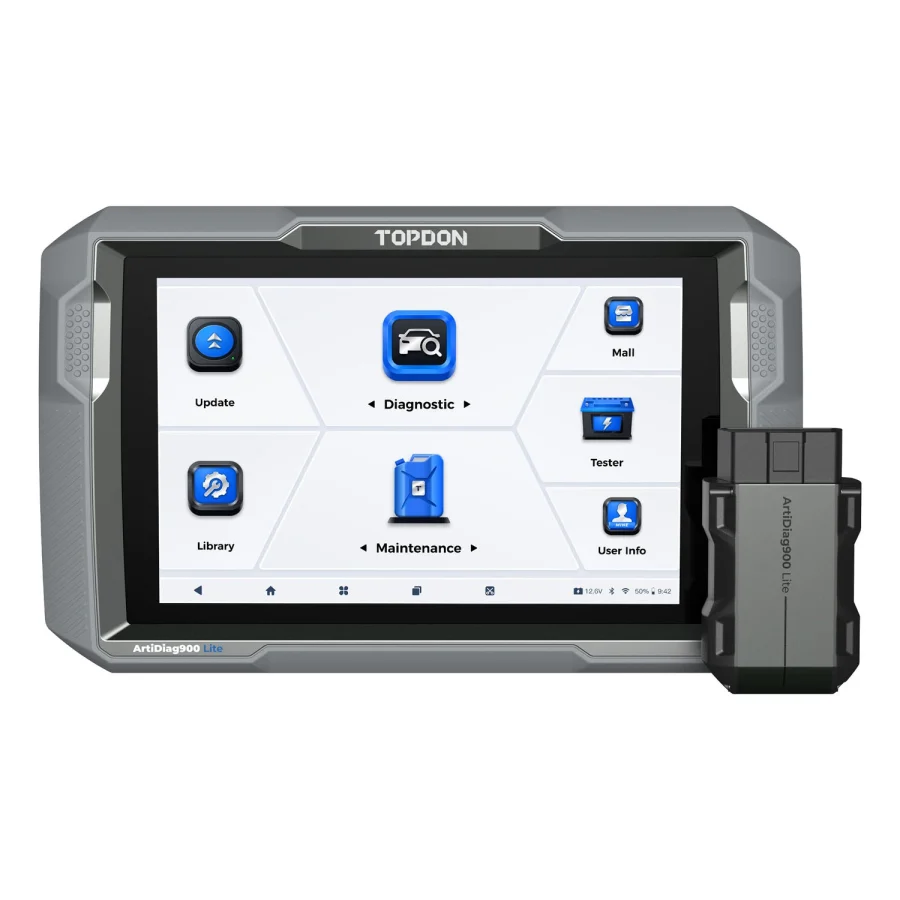
TOPDON’s ArtiDiag900 Lite offers wireless full-system diagnostics, data streams, AutoVIN and bidirectional tests, with an eight-inch tablet. Its current US listing advertises free lifetime software updates. Although many owners will also value its eight named service categories for later maintenance, those service functions should not be used on a seller’s vehicle during a passive inspection.
Best use: Someone who wants a multipurpose scanner with full-system reading capability for a small group of familiar vehicles, and who confirms the specific modules that can be accessed. The lifetime update language deserves a careful reading: the useful coverage still depends on model support, manufacturer policy and the vehicle.
Limitation: Do not confuse an all-system marketing description with complete manufacturer-specific access to every optional module, theft-protected feature or body computer.
5. TOPDON ArtiDiag900BT — for owners who need more than an inspection tool

The ArtiDiag900BT has a seven-inch wireless display, full-system diagnostics and 28 advertised service categories. It may be appealing to buyers who expect to keep and work on several vehicles after the purchase. In that case, the device’s larger maintenance range might produce value later, although vehicle-specific coverage remains essential.
TOPDON states that two years of software updates are included and publishes a one-year renewal offer at $249 as of this research date. That can matter for an owner who expects to inspect newer model years over time. If the instrument is bought just to evaluate one vehicle, those long-term software concerns make a case for considering a professional inspection instead.
Best use: Ongoing diagnostics on supported vehicles plus occasional pre-purchase checks, after weighing the renewal policy. Limitation: Purchase inspection itself should be read-only; advanced service menus are not needed to decide whether a car merits further evaluation.
6. XTOOL D7S — wired diagnostics that can become a long-term workshop tool

The D7S manufacturer page advertises full-system scanning, fault-code reading, freeze frame, live-data graphing and recording. It includes a seven-inch wired tablet, CAN FD/DoIP and three years of updates. Those are useful categories for an owner who wants to preserve diagnostic data rather than just read a check-engine light.
XTOOL separately warns that the VAG Guidance feature is suspended in the US. That specific regional restriction should not be interpreted as a wholesale inability to read any Volkswagen-group codes, but it highlights why a buyer must verify actual coverage. Similarly, a function name such as “full-system diagnostic” is not an unconditional promise to access every controller on a given vehicle.
Best use: Someone who prefers a wired tool and expects to do further repair work. Limitation: Reading engine and ABS fault data cannot prove that a braking or restraint system is safe, and fault clearing destroys evidence rather than repairing defects.
Emissions readiness: an often-overlooked buying clue
Generic OBD emissions systems provide information about whether certain monitoring routines have completed. An illuminated malfunction indicator light (MIL), emissions fault codes and readiness status can therefore be relevant during a used-car evaluation. A code-free screen is not the same as all monitors being complete, and a monitor marked “not ready” is not automatically proof of fraud or a mechanical defect. The car may recently have had its battery disconnected, undergone repairs or been driven insufficiently under the conditions needed to complete monitors.
EPA’s documented OBD inspection procedures show that emission readiness status is a separate consideration from whether codes are present. The number of incomplete monitors allowed in official inspections can vary by model year, jurisdiction and test program; do not present one threshold as universal law. During a pre-purchase check, record the monitor status and ask a mechanic to interpret it in the context of recent service and the vehicle’s operating conditions.
Do not clear fault codes before the sale. Clearing can erase freeze-frame and other diagnostic evidence and may reset readiness monitoring, making the inspection less informative. A seller who will not permit an independent inspection or refuses to explain an incomplete readiness state may justify extra caution, but a single scan observation is not a verdict.
ABS, airbag and transmission codes require context
A basic emissions reader is focused on powertrain-related standardized information. Enhanced scanners may be able to communicate with other modules. Finding a stored ABS or SRS fault can be important, but the absence of a stored fault does not prove the system works correctly. A vehicle may have recently been repaired, a fault might be intermittent, or the scanner might not support that module. Diagnostic tests must not be confused with a comprehensive safety inspection.
Likewise, a transmission module that communicates and reports no active DTCs does not prove a transmission will behave well under load, when hot or over many miles. A knowledgeable inspection should examine the vehicle’s behavior, fluids, maintenance records and other signs as appropriate. The scan tool is a source of evidence, not the sole decision maker.
Our SRS scanner guide explains the coverage checks for restraint modules. For emissions-related clues, the guides to pending, stored and permanent codes and readiness monitor status help interpret what a scan report can and cannot establish.
A responsible, read-only pre-purchase worksheet
For a buyer who has the seller’s consent to perform a diagnostic check, document information rather than modifying the car:
| Record | Why it matters |
|---|---|
| VIN, year, make, model, engine and market | Prevents confusing variants and histories |
| Date, mileage and environmental conditions | Provides context for observations |
| MIL status and reported generic codes | Captures emissions-related faults |
| Readiness monitor status | Helps interpret whether monitors completed |
| Available enhanced module codes | May reveal concerns beyond generic powertrain |
| Freeze-frame information, if available | Gives context for when a fault was recorded |
| Unsupported or inaccessible modules | Documents limits of the chosen tool |
| Independent mechanic’s findings | Provides a broader physical-condition assessment |
Never publish a seller’s full VIN or private data online without authorization. When sharing a screenshot or PDF, remove private fields where appropriate and preserve the original for legitimate inspection records.
What a scanner cannot tell you
It cannot reliably establish crash or flood history, prove the odometer reading, check structural repairs, measure brake friction material, inspect the underbody for rust, detect every intermittent misfire, evaluate accident repair quality or confirm the condition of tires, suspension or steering. It also cannot replace a qualified inspection of a high-voltage electric-vehicle battery system. The information available varies by vehicle platform and scanner.
That is why the FTC’s used-car guidance recommends an independent mechanic’s inspection even when a vehicle-history report exists or the dealer states that a car was inspected. NHTSA also offers a VIN-based recall lookup. Both are separate steps from electronic diagnostics.
When buying a scanner is not the best value
If this is the only used car you plan to inspect in several years, purchasing a professional tablet may be disproportionate. A lower-cost basic OBD reader can provide some emissions-related data, but it cannot replace a complete independent pre-purchase inspection. A professional mechanic may already have vehicle-specific equipment and can examine brakes, chassis, leaks, suspension, road behavior and service records. Even experienced DIY owners benefit from that independent perspective when purchasing an unfamiliar model.
If you regularly inspect used vehicles or plan to maintain several family cars, owning an enhanced scanner becomes more defensible. Prioritize reliable saved reports, current coverage for your vehicles and transparent software costs rather than counting the most service icons.
Three patterns in a scan report—and what they really suggest
Pattern A: no current codes, but several readiness monitors are incomplete. This is not proof of a hidden mechanical failure. A recent battery disconnection, legitimate repair, code clearing or insufficient qualifying driving can leave monitors incomplete. The right response is to document the result, ask about recent work and obtain independent interpretation. A buyer should not try to force monitors ready or reset them during the inspection.
Pattern B: a fault is stored in a non-powertrain module. An enhanced tool may show an ABS, SRS, transmission or body-system issue that a basic emissions reader cannot see. Record the exact code and module identity; a generic lookup may omit manufacturer-specific context. The fault could be current, historic or intermittent, and repair cost cannot be estimated responsibly from the code alone. The independent mechanic can assess whether the problem is active and what follow-up work is warranted.
Pattern C: a module does not respond. It may be absent, unsupported, protected by a gateway, asleep in the present operating state, affected by supply-voltage problems, or genuinely unable to communicate. This is a reason to investigate, not a reason to automatically conclude that the car has a damaged computer. Capture the scanner’s “not supported” or “no communication” wording and the conditions under which it occurred.
These patterns illustrate the value of saved evidence: a dated report lets a qualified inspector distinguish something directly observed from something merely suspected. The report should include the scanner model and software version where available, because a missing code on an unsupported scanner isn’t the same as a module tested successfully.
Comparing the cost of a tool with an independent inspection
Before ordering a high-ticket diagnostic tablet, write down how many vehicles you genuinely expect to inspect in the next year. If the answer is one, a scanner purchase is usually harder to justify purely on pre-purchase grounds. An independent mechanic can assess more than electronic modules and may identify repairs the scanner cannot reveal. If you also intend to maintain cars for several years, hardware and software costs may be spread across several uses, but those later benefits require real tasks—not speculative savings.
A pre-purchase budget should distinguish three separate expenses: a vehicle-history report, an independent mechanical inspection, and optional electronic scanner equipment. They serve overlapping but nonidentical purposes. A history report can identify recorded events without guaranteeing physical condition. The mechanic can inspect brakes, steering, corrosion, accident repairs and drivability. The scanner can add electronic observations within its supported coverage. None of the three alone provides certainty.
If the seller refuses a reasonable independent inspection, weigh that more heavily than an attractive “all modules clear” display. The FTC recommends an independent inspection and explains that a vehicle history report is not a substitute. A scanner adds electronic evidence, but it cannot replace that assessment of the vehicle.
Common questions
Can a scanner tell me if a used car is good?
No. It can show certain electronic diagnostic information, while an independent inspection evaluates physical condition and other issues a scanner cannot see.
If there are no codes, is the car safe to buy?
No. Not all defects set diagnostic codes, not all modules are supported by each tool, and codes may have been cleared previously. Check readiness and have the vehicle inspected.
Can I scan a dealer’s car without permission?
Ask for clear permission before connecting a device. Use read-only functions appropriate to a pre-purchase evaluation and do not modify vehicle data or settings.
Should I buy a bidirectional scanner just to inspect a car?
Usually the important first features are codes, readiness, freeze-frame, enhanced module access where needed and reports. Active tests are not generally the starting point for a buyer’s read-only inspection.
Does an emissions-ready status guarantee a healthy engine?
No. Readiness means a defined monitor has completed its required checks under the relevant conditions; it is not a comprehensive engine-health certification.
Final recommendation
Begin with the Innova 5610 as a compact enhanced-inspection candidate for supported US/Canadian vehicles. Investigate the Autel MK900-BT or XTOOL D8S if you need all-system reports and richer data for continuing vehicle maintenance. Consider TOPDON ArtiDiag900 Lite, TOPDON ArtiDiag900BT, or XTOOL D7S if their verified coverage fits your cars and you will use the tools beyond a single purchase.
But the most important purchase decision may be not buying a scanner at all: for a one-time used-car evaluation, reserve money for an independent professional inspection. A scan report is supporting evidence, not a purchase guarantee.
Official sources
- FTC: Buying a Used Car From a Dealer
- NHTSA: Check for Vehicle Recalls
- EPA: OBD inspection and readiness procedures
- Innova 5610 and vehicle coverage guidance
- Autel MK900-BT official product
- XTOOL D8S official product
- XTOOL D7S official product
- TOPDON ArtiDiag900 Lite official product
- TOPDON ArtiDiag900BT official product