Best TPMS Programming Tools for Home Mechanics: 6 Models and Relearn Differences

In this guide
The word TPMS on a diagnostic tool’s box is not enough to predict what it can do. One device may read a pressure warning, another may trigger a wheel sensor, while another programs replacement sensors and writes new identifiers to a vehicle’s tire-pressure module. These are separate tasks with different hardware and software requirements.
Affiliate disclosure: As an Amazon Associate I earn from qualifying purchases.
Quick verdict: Autel TS508WF is a practical place to investigate a dedicated TPMS programmer for Autel MX-Sensors. Autel ITS600 and MK900-TS suit different buyers who want modern TPMS menus or a combination of diagnostics and tire service. ATEQ VT56 deserves consideration for multi-brand sensor-programming workflows, subject to its accessory bundle. Autel TS608 combines tire service with general system diagnostics on an older platform, while Autel TS601 is an older specialist option that should only be considered if its exact support and authorized availability are confirmed.
This is not a test of actual sensor programming, RF activation distance or relearn success. The descriptions are based on published manufacturer information; the exact vehicle, sensor part number, frequency, region and installed software determine what can be performed.
Six TPMS tool candidates
| Tool | Primary reason to investigate | Programming/relearn distinction | Key purchase risk |
|---|---|---|---|
| Autel TS508WF | Dedicated TPMS with Wi-Fi updates | Officially programs Autel MX-Sensors and supports relevant relearns | Not an all-brand sensor programmer |
| Autel ITS600 | Modern TPMS-focused tablet | Published sensor activation, programming and relearn | Verify bundle, accessories and regional coverage |
| Autel MK900-TS | Wider diagnostic tablet plus TPMS | Official comparison lists full TPMS against MK900-BT’s basic TPMS | Higher cost and subscription policy |
| ATEQ VT56 | Multiple aftermarket sensor brands | Relearn and programming workflow, OBD module involved | Accessories and distributor availability |
| Autel TS608 | Full TPMS service plus diagnostics | TPMS functions and broader system diagnostics | Older software/platform, seller verification |
| Autel TS601 | Older TPMS specialist platform | Historical official manual and supported functions | Current support, stock, sensors and updates uncertain |
1. Autel TS508WF — dedicated TPMS work first

Autel’s current TS508WF page describes sensor activation, pressure and battery-state readings where provided by the sensor, and programming of Autel MX-Sensors. It also lists on-tool relearn instructions and supported OBD relearns. The important distinction is brand: “programs sensors” should not be restated as “programs every aftermarket TPMS sensor.”
A buyer who primarily replaces compatible Autel MX-Sensors may find a focused tool easier to justify than a professional all-systems tablet. Check whether the package actually includes the OBD cable and how many sensors, if any, are bundled. The manufacturer lists Wi-Fi updating, but exact supported vehicle functions still depend on installed software and vehicle profiles.
2. Autel ITS600 — a TPMS tablet-oriented workflow
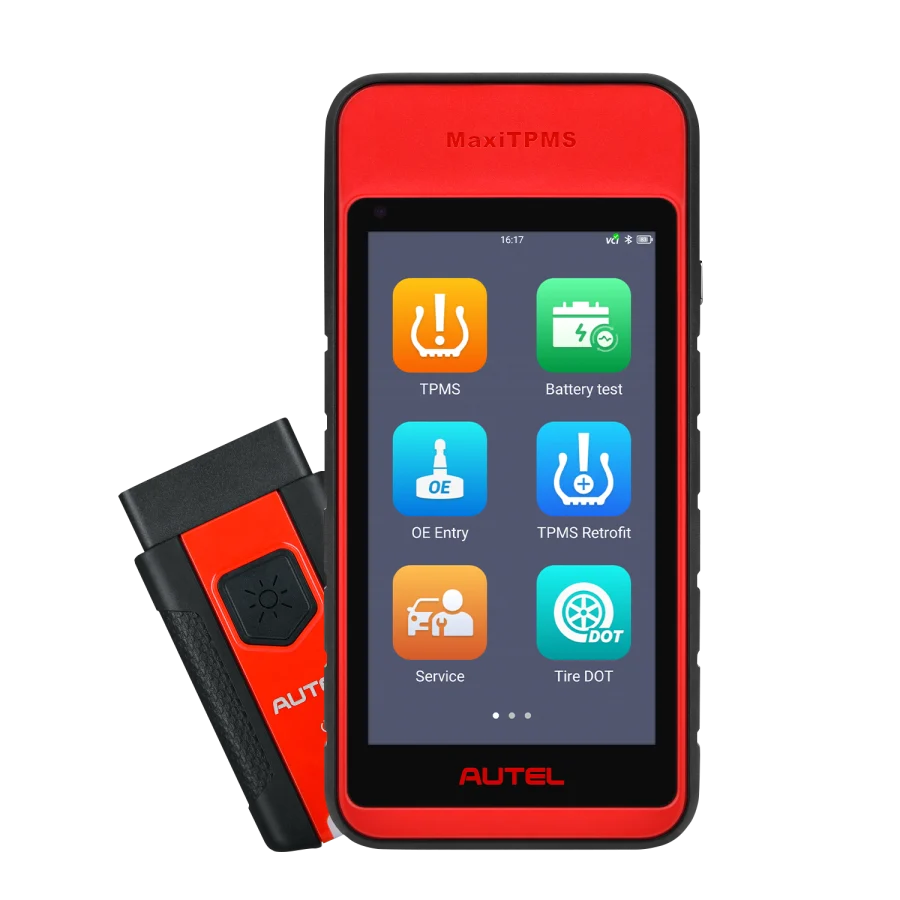
The ITS600 is a different TPMS interface from a small dedicated handheld. Autel’s comparison documents sensor activation, programming and relearn capabilities, including more convenient vehicle identification and service functions. That can matter for a user handling multiple makes, provided the intended sensor type is supported.
Choose it because you need its specific workflow—not because a larger screen must mean greater universal sensor coverage. Compare its programming modes, sensor batch handling, warranty and update terms against the TS508WF before ordering. Do not assume that the firmware version shown in a third-party listing matches the current US coverage table.
3. Autel MK900-TS — diagnostic tablet with full TPMS

Autel’s official MK900 family comparison is unusually useful here. It labels the MK900-TS with complete TPMS capabilities and distinguishes the ordinary MK900-BT’s basic TPMS features. It lists sensor activation and Autel MX-Sensor programming for MK900-TS. Therefore, do not recommend a standard MK900BT as a cheaper replacement when the user actually needs sensor programming.
The MK900-TS becomes interesting when the buyer wants full-system diagnostic features, active tests and an integrated tire-pressure service device. Its value depends on whether both categories of work are regularly required. Before purchase, compare device identification, included VCI and software-update rules; the TPMS-specific upgrade does not establish broader diagnostic compatibility for every vehicle.
4. ATEQ VT56 — multiple aftermarket sensor ecosystems

The linked Amazon listing is labeled as a VT56 master kit with an OBD module, docking station and printer. Compare those contents with the package you need before ordering.
ATEQ markets the VT56 as a comprehensive TPMS service tool and highlights programming of several major aftermarket sensor brands. Unlike a device limited to one manufacturer’s sensor family, that can matter for a tire-service environment. The vendor also describes vehicle-specific procedures and OBD relearn coverage.
Important accessory issue: ATEQ says the OBDII module is needed for many relearn operations. Verify whether the exact VT56 kit includes that module or whether it must be purchased separately. A low advertised price for a tool without its essential accessory may not be the cheapest workable setup. Also confirm current updates and authorized dealer support rather than trusting historical kit descriptions.
5. Autel TS608 — legacy multifunction option
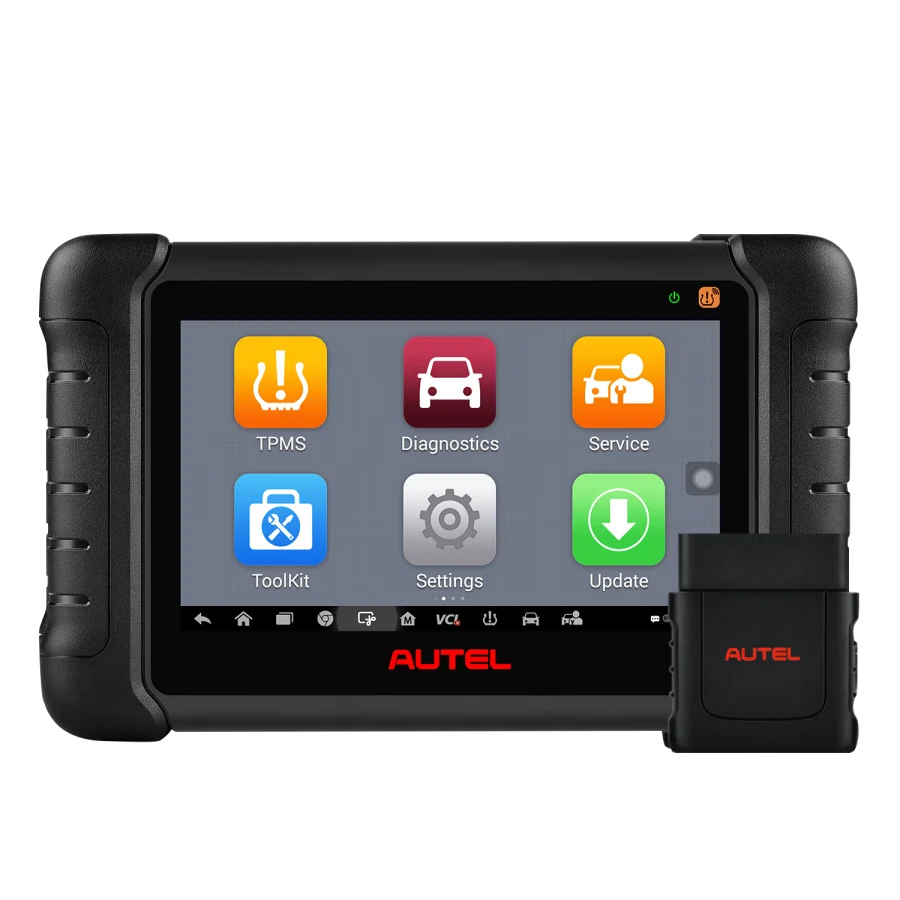
The TS608 combines TPMS programming/relearn with broader diagnostic categories, according to Autel’s documentation. It may appeal when a buyer needs both activities but has access to a verified, supported unit. Confirm current availability and support for the TS608 itself; a listing for a different Autel model does not establish TS608 availability.
Its older Android platform also means readers should compare long-term support carefully. A retired or limited-service device can be an expensive mistake even if the original feature list looks strong. Seek a verified product serial number, current function list and seller’s supported-update position.
6. Autel TS601 — documentation exists, but treat as legacy

Autel still maintains older TS601 reference material. The existence of a manual is useful for understanding the product, but it is not proof of a current, supported US retail offer. This candidate belongs on a comparison shortlist only if the buyer already owns one or can confirm support, update access and exact sensor compatibility.
Treat the TS601 as a legacy comparison when planning a new purchase. A newer, supported tool may be a better choice if update access or sensor coverage cannot be confirmed for the exact TS601 unit.
Programming, activation and relearn are different jobs
Activation: The tool sends an appropriate RF request to wake or read a sensor. Success tells you a sensor responded; it does not necessarily tell the vehicle to accept that sensor.
Programming: A programmable aftermarket sensor is configured with a compatible identity/protocol, often using a brand-specific or supported multi-brand programming process. A tool that reads an OE sensor is not automatically capable of programming a replacement.
Relearn: The vehicle is taught which sensor identifiers belong to its wheels. Some models relearn automatically; others use a manual or stationary procedure, while still others require OBD communication. ATEQ explicitly differentiates auto, stationary and OBD relearns. The procedure varies by vehicle make, model and year.
Indirect TPMS: Some vehicles infer changes through wheel-speed data rather than direct wheel-pressure transmitters. Buying replacement wheel sensors for an indirect-only system will not solve the problem. Determine whether the vehicle has direct or indirect TPMS first.
Complete setup cost versus sticker price
A practical kit may require a compatible sensor family, OBD cable/module, software access, Bluetooth VCI, and a computer for updates. Some TPMS tools also display data only when the sensor broadcasts it; an unavailable battery value is not always a tool defect. Avoid a table promising temperature or battery readings for every OEM sensor.
| Cost or compatibility element | What to verify |
|---|---|
| Main tool | Exact generation, regional SKU and seller |
| Sensor programming | Supported sensor brands and exact part numbers |
| Vehicle coverage | Make, model, year, market, wheel system |
| Relearn method | Auto, stationary, manual, OBD or indirect reset |
| Required accessories | OBDII module, Bluetooth VCI, cables, docking accessories |
| Software updates | Included period, renewal terms and coverage status |
| Repair documentation | Correct vehicle procedure, pressure values, and service precautions |
For tire pressure and wheel work, follow the vehicle’s specified placard values and service procedures; the presence of a TPMS menu is not permission to alter pressure thresholds without appropriate justification.
Three buying scenarios
A home owner replacing one compatible Autel MX-Sensor should first check TS508WF coverage and whether the relearn procedure works for the exact car. A larger tablet adds cost without necessarily changing that one job.
A tire shop seeing many different sensor brands may benefit from ATEQ’s broader programming ecosystem, but the required OBD module and licensed sensor support must be checked. Total ownership includes updates and accessories.
A mechanic who also needs multi-system diagnosis may justify MK900-TS or a supported TS608 revision. The risk is buying the general MK900-BT for tire service simply because both product names contain “MK900.” The manufacturer clearly differentiates them.
Example: replacing one wheel sensor on a car you own
Before deciding which tool to purchase, ask the service shop or vehicle manual whether the vehicle uses direct or indirect TPMS. If it has direct TPMS, identify the sensor’s OEM part number and whether the replacement is pre-programmed or programmable. If programmable, establish which programming tool and sensor families match. A TPMS activator alone may wake the sensor but be unable to create or assign a new programmable sensor ID. That is why a low-cost activation tool is not necessarily a substitute for TS508WF or VT56.
Next determine the vehicle’s relearn pathway. ATEQ separates automatic, stationary, OBD and indirect reset approaches. Some vehicles recognize familiar IDs automatically; others require a learn mode or diagnostic writing process. The procedure may differ by market and model year. A purchase should not proceed until the tool can support the actual method and the user understands when authorized tire service is required.
Finally, compare the accessory kit. An ATEQ VT56 without its required OBD module for an OBD relearn is not directly comparable to a TS508WF bundle whose OBD cable is included. Record the official kit code and accessories, not just the product family’s name. A third-party Amazon listing may combine different sensor packs, cable sets or older hardware versions under one title.
Example: adding TPMS service to a small tire shop
A shop handling many brands should research sensor-programming breadth rather than buy for one vehicle. The ATEQ ecosystem emphasizes programming multiple leading aftermarket sensors; Autel has a substantial MX-Sensor-oriented ecosystem. Neither approach is automatically superior: the outcome depends on the sensors stocked, vehicle mix, preferred inventory, update licensing and the service procedure. A shop already stocking Autel-compatible sensors may value a straightforward MX-Sensor workflow. A shop dealing with many sensor brands may place more weight on ATEQ’s published multi-brand list.
For a repair business, coverage evidence should identify the sensor part number, vehicle, and relearn method. A generic “99% vehicle coverage” claim cannot replace such verification. Test the buying decision with a sample of the vehicles that actually appear in the shop, then confirm each pairing with current vendor documentation. Don’t fabricate an average success rate from manufacturer marketing language.
Do you need a scanner tablet with TPMS built in?
For an owner whose main job is replacing a sensor, a focused TPMS tool may be more economical and easier to justify. A mechanic also performing ABS, EPB, battery registration and pre/post system scans may benefit from MK900-TS. The MK900-TS’s real value is the combination of two kinds of work, not that a professional-looking screen is inherently better. Compare it with MK900-TS vs MK900-BT and do not confuse the latter’s basic TPMS functions with full programming.
The TS608 could also cover multiple categories according to Autel, but its older platform creates different support and stocking questions. An older model should not be recommended over a newer one purely because its historical feature count is high. Ask about current software and sensor coverage and whether a new US listing is genuinely available.
TPMS compatibility table to prepare before buying
| Field | Example of useful evidence |
|---|---|
| Vehicle | Exact model year, trim, wheels and original market |
| System type | Direct or indirect TPMS from service documentation |
| Sensor | OEM number or exact compatible programmable replacement |
| Function | Activation, ID programming, relearn, reading TPMS DTCs |
| Relearn route | Automatic, stationary, OBD or indirect reset |
| Hardware | Tool revision, OBD accessory and supported sensor brands |
| Software | Update entitlement and current coverage data |
Keep those records with any planned purchases. If information is missing, mark it as not established rather than promising the feature. A good article should be able to say “this tool is not a good fit for your use” when evidence is insufficient.
Service safety and limitations
Wheel removal, tire installation and inflation have risks unrelated to electronics. Do not infer from a TPMS menu that a user can safely dismount tires or adjust electronic pressure thresholds. Follow the vehicle’s placard and tire/wheel service instructions, and refer work requiring tire mounting or pressure-system calibration to a qualified professional.
Frequently overlooked sensor compatibility details
Sensor frequency and market: Vehicles in different markets can use different TPMS radio frequencies and software protocols. A seller’s claim of regional or worldwide support must be checked against the exact sensor SKU and vehicle. Do not buy a sensor pack solely because it fits the wheel or because the programming tool recognizes the car’s brand.
Cloning versus assigning a new ID: If a replacement sensor is legitimately programmed to the same recognized identifier, the vehicle’s required next step may differ from installing a sensor with a new identifier. The vehicle’s documented relearn method still determines what is permitted and needed. Never assume that cloning is universally available or appropriate.
Battery and sensor data: A TPMS tool may display pressure, frequency, sensor ID or battery information only when supported and transmitted by the sensor. “No temperature reading” does not necessarily mean the tool has failed. Autel’s support FAQ explicitly cautions that not all OEM sensors supply every parameter.
Wheel position and tire rotation: Many direct TPMS systems need a location relearn after rotation or sensor replacement, whereas some systems automatically update position. The correct procedure depends on vehicle engineering and firmware. Do not infer sensor location from a generic dashboard label.
Indirect TPMS: An indirect system may use wheel-speed information instead of an RF pressure sensor in each wheel. A new programmable sensor and a TPMS activator may be irrelevant to that vehicle. This is an early elimination question, not a footnote.
What this guide cannot verify without testing
The shortlist compares documented tool functions and ownership requirements, rather than measured programming success, radio range, battery runtime or sensor accuracy. Those performance outcomes have not been tested here. Use the manufacturer compatibility information to check the exact vehicle, sensor part number, frequency and required programming or relearn method, then compare the supported kit and update terms.
A conservative tool-buying sequence
Identify direct/indirect TPMS and the original sensor part number; determine the vehicle’s relearn method; list supported replacement sensor brands; check the precise tool model and included OBD module or cable; compare update terms and current US authorized distribution; only then evaluate purchase cost. If the planned purchase lacks the accessories or sensor-brand coverage necessary for the actual job, the lowest advertised price is misleading.
Is the most expensive TPMS tablet necessary?
A one-car household may replace one sensor every several years. Paying for a large tablet, annual updates and multiple programming modes may have little value if the correct dedicated tool and sensor can accomplish the documented job. In contrast, a tire-service business with many supported vehicles may value faster vehicle selection, multiple sensor brands and OBD relearns. The commercial decision should reflect actual workloads, not a price-based ranking. A useful article must say when professional tire service is a better choice than buying equipment for one uncertain job.
Data readers versus programming tools
An ordinary OBD2 adapter can sometimes show TPMS fault-related data through an enhanced app, but that does not make it a TPMS sensor activator or programmer. A professional diagnostic tablet may read TPMS module DTCs without transmitting the RF signals needed to activate wheel sensors. Only the exact product’s documented hardware and software functions establish that capability. This is why our TPMS activation versus programming guide should be read before a purchase.
A one-page buyer decision tree
Start by asking whether the vehicle has direct TPMS. If it has indirect TPMS, seek its approved initialization method instead of shopping for programmable wheel sensors. If direct, check whether an existing sensor merely needs a location relearn or is truly being replaced. For replacement, confirm the new sensor brand and protocol. If programming is needed, use a compatible tool from its documented list; if an OBD relearn is required, confirm the OBD interface is included. If the procedure is unclear, defer purchase and seek verified service information.
For vehicles with a spare wheel sensor or multiple wheel sets, confirm how the tool tracks identifiers and how the vehicle learns each configuration. Tool capability may differ when the same model has separate seasonal wheel sets. Do not assume a dashboard TPMS light means a failed physical sensor; pressure, receiver and configuration faults can produce warnings that require diagnosis first.
Those source and accessory checks are essential to an accurate, honest TPMS tool recommendation.
FAQs
Does a TPMS reset tool program new sensors?
Not automatically. Reset, activation, programming and vehicle relearn are separate capabilities. Confirm which process is required.
Can any tool program every TPMS sensor brand?
No blanket claim is justified. The sensor manufacturer’s protocol and tool’s supported programming list must match. Autel tools may specifically program the Autel MX-Sensor family.
Do I always need an OBD module for relearn?
No. ATEQ explains that auto and stationary procedures differ from OBD relearn. The required equipment depends on the vehicle.
Is the MK900-BT a TPMS programmer?
Autel’s family table distinguishes MK900-BT’s basic TPMS from MK900-TS’s more complete sensor-programming functions. Verify the exact function before buying.
Final recommendation
Start with TS508WF for dedicated work on compatible Autel sensors. Compare ITS600 or ATEQ VT56 when their documented sensor and workflow support matches more involved tire service, and consider MK900-TS when you also need the scanner’s broader diagnostic functions. TS608 and TS601 are older alternatives whose current support, software access and genuine kit availability need particular care. For every model, match the actual sensor family, vehicle and relearn procedure, and check the complete accessory bundle before ordering. The most useful tool is the one that covers that specific workflow with support you can continue to obtain.