Best Scan Tools for Electronic Parking Brake Service: 6 Models to Verify

In this guide
Replacing rear pads on a vehicle with an electronic parking brake (EPB) may require a diagnostic routine that places the parking-brake system into its manufacturer-defined service state. That is not the same thing as simply turning off a parking-brake warning light. An inexpensive code reader might read a powertrain fault but have no access to the parking-brake controller; a more capable scan tool may display an EPB menu without supporting the actual routine for your vehicle.
Affiliate disclosure: As an Amazon Associate I earn from qualifying purchases.
Quick verdict: Investigate the Autel MaxiCOM MK900-BT if you want a documented EPB service workflow alongside a broader wireless all-system tablet. The TOPDON ArtiDiag900 Lite deserves attention for owners who need a narrower group of named maintenance routines and prefer its currently advertised update entitlement. TOPDON ArtiDiag900BT, XTOOL D7S, XTOOL D8S, and Innova 5610 are worthwhile alternatives when their exact coverage checker confirms your car’s EPB procedure. None is a universal EPB tool.
This is a documented shortlist, not a test ranking. We have not used these devices on a brake system, measured their reliability, or verified live Amazon inventory. Product specifications were checked against manufacturer materials in October 2026. Do not treat this article as a brake-repair procedure. Brake systems are safety-critical; follow the vehicle’s current factory service information and involve a qualified technician when needed.
Six scanners compared
| Model | Manufacturer evidence for EPB work | Connection | Key reason to consider | Purchase check |
|---|---|---|---|---|
| Autel MK900-BT | Official user manual has an EPB service section | Bluetooth VCI | Wireless all-system scanner with formal documentation | Confirm your exact service menu and update entitlement |
| TOPDON ArtiDiag900 Lite | Official specifications list Brake Reset | Wireless VCI | Eight named services and free-lifetime-update listing | Brake Reset label does not establish every EPB procedure |
| TOPDON ArtiDiag900BT | Official product lists Brake Reset among 28 service functions | Wireless VCI | Broader advertised services and coding categories | Different renewal costs and function coverage |
| XTOOL D7S | Official special-function catalog lists EPB | Wired | Broad advertised function set, CAN FD/DoIP | Verify vehicle coverage and US-specific restrictions |
| XTOOL D8S | Manufacturer lists EPB among 42-plus service functions | Wired | Topology mapping and expanded diagnostics | Paying more does not guarantee EPB support on your car |
| Innova 5610 | Official product information names EPB reset | Wired handheld | North American-focused enhanced diagnosis | Check feature availability by exact vehicle |
The specifications establish advertised product capabilities, not confirmation that the procedure works for a particular VIN. In some cars the required workflow includes maintenance mode, controlled actuator movement, calibration, fault checking, or a separate relearn. The tool’s wording may differ from the vehicle manufacturer’s terminology.
What an EPB service tool needs to do
An electronic parking brake can use electrically actuated rear calipers, an electric cable-pull actuator, or another manufacturer-specific configuration. This changes the service operation and its risks. On relevant vehicles, the scanner communicates with the parking-brake controller and requests supported actions; it does not mechanically replace the correct servicing and verification steps.
Autel’s published MK900-BT user manual describes EPB service functions including deactivation and activation of brake control, support for brake-related maintenance, pad opening/closing and post-service operations. Its safety section warns that users should understand the brake system before maintenance, keep the vehicle stationary and on level ground, and restore the required EPB state afterwards. That documentation is useful evidence for the type of job the product can perform, not proof for an unknown vehicle.
Three terms frequently cause confusion:
- EPB service or maintenance mode: A controlled state used when certain brake components are being serviced. This is a system action, not merely clearing a stored fault.
- EPB reset or relearn: Depending on manufacturer, this can mean a procedure after replacement or calibration, or a fault-related operation. The label alone is not specific enough.
- ABS bleeding: A separate brake-hydraulic process, sometimes requiring an electronically commanded valve or pump routine. It is not an alternative name for EPB service.
If the vehicle’s instructions say a particular EPB motor must be retracted in service mode, do not assume the same instructions apply to a different car with the same badge. Always establish the exact vehicle, model year, market, braking configuration and required factory procedure before choosing a device.
Hydraulic ABS bleeding is a different requirement from entering an EPB maintenance mode. The ABS-bleeding scanner guide compares tools by that separate function and the coverage evidence needed for it.
1. Autel MaxiCOM MK900-BT — strongest documented EPB workflow for readers wanting a general tablet

The official MK900-BT user manual has a dedicated electronic parking-brake service section, which is more useful than a sales page mentioning only a generic “brake reset.” Autel identifies functions related to activating and deactivating the controller for appropriate maintenance tasks. Its product page describes full-system diagnostics, active tests, pre/post scan reporting, CAN FD and DoIP communication, and an eight-inch Android tablet with wireless vehicle communication.
For an owner maintaining several vehicles, that combination matters because EPB service may be one of several tasks. The same device can assist with fault-code investigations, viewing vehicle-supported live data and documenting changes before or after work. Yet these are distinct capabilities: a scan report is not proof that a brake service was performed correctly, and active tests are not necessarily available on every module.
Pros supported by documentation: Dedicated EPB user-manual guidance; wireless VCI; broad all-system diagnostic scope; modern protocol listings; reports useful for documentation.
Limitations: The EPB application must be checked for the exact vehicle. Autel’s general service description is not a substitute for coverage confirmation. An advertised DoIP or CAN FD protocol doesn’t mean every model-specific EPB routine is implemented. Current US software renewal and authorized-seller details must be checked before recommending a particular listing.
Best suited to: A buyer who needs an all-around wireless tablet and has written manufacturer confirmation of the required EPB procedure. See our MK900BT vs MK808BT Pro comparison for the generational upgrade decision.
2. TOPDON ArtiDiag900 Lite — a narrower service menu with an attractive update policy
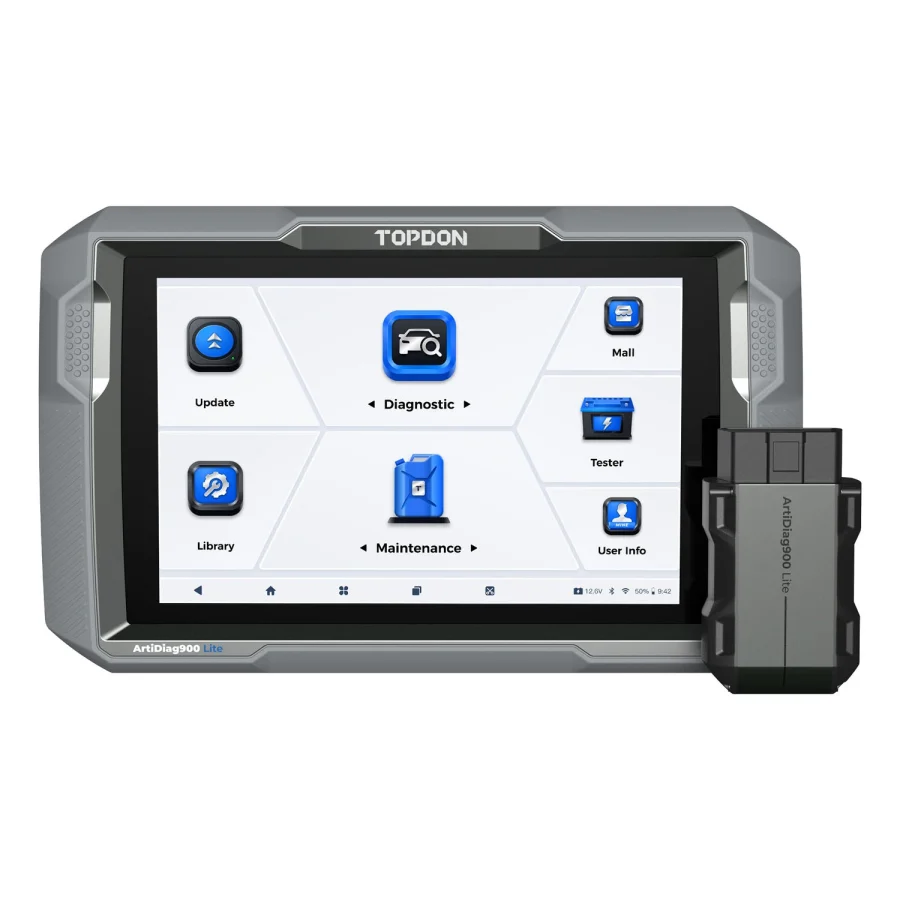
TOPDON lists Brake Reset among eight maintenance categories for the ArtiDiag900 Lite, along with BMS reset, steering-angle reset, ABS bleeding and others. The current US listing advertises an eight-inch tablet, wireless VCI, bidirectional controls and free lifetime updates. The company uses “lifetime” in the context of device support; buyers should not interpret that as guaranteed compatibility with every new vehicle indefinitely.
The important trade-off is feature breadth. Eight named maintenance categories may be perfectly adequate if your confirmed job is among them. But “Brake Reset” could describe different operations on different vehicles, and it is not automatically the equivalent of all possible caliper service routines. Request specific confirmation using the manufacturer coverage tool and, ideally, a written response for your year/make/model and exact brake operation.
Pros supported by documentation: Named brake-service category; eight-inch wireless design; manufacturer-advertised lifetime-update arrangement; all-system diagnosis and active tests at the product-family level.
Limitations: Narrower named service menu than the ArtiDiag900BT; no promise that all EPB actuators, replacement procedures, or adaptations are covered; regional and gateway access may affect functions.
Best suited to: The careful DIY owner who knows the needed operation and has confirmed it in TOPDON’s current coverage information. If you may also need battery registration, compare the overlap with our battery-registration guide.
3. TOPDON ArtiDiag900BT — broader maintenance menu, but watch the ownership cost

The ArtiDiag900BT is a different model with a seven-inch screen, wireless VCI and 28 advertised service functions. TOPDON mentions Brake Reset, ABS Bleeding, DPF service and other maintenance categories. Its current US page lists two years of included software updates, and TOPDON separately lists a one-year renewal at $249 as of this research date. That figure is an official manufacturer renewal price, not an Amazon selling price.
This distinction matters if you plan to keep the scanner for several years. Some owners may never need software covering newer vehicles and may not renew; others servicing changing fleets will value continued updates. A feature-rich menu is not necessarily economical if the one required EPB routine is already supported on a simpler tool.
Pros supported by documentation: Wider named maintenance portfolio; wireless format; extensive advertised coding and bidirectional categories; specific renewal offer publicly available.
Limitations: Subscription costs are higher than a device with no paid renewal under its current terms; not all operations will be offered for each car; coding is not unlimited OEM programming. Avoid confusing this product with the 900 Lite.
Best suited to: A multi-vehicle user who can justify the broader service menu. Read our TOPDON 900BT vs 900 Lite comparison before selecting based on model name alone.
4. XTOOL D7S — wired service coverage with an extensive official EPB listing

XTOOL’s current D7S specifications list EPB in the special-function catalog, in addition to active tests, all-system diagnostics, live-data recording, CAN FD/DoIP and 39-plus advertised service functions. The seven-inch device connects by cable and carries a stated three-year included software-upgrade period.
Why it may fit: A buyer comfortable with wired operation might prioritize functional breadth and ease of keeping the tool connected during a workshop session. In a garage, not having to maintain wireless pairing can be a genuine preference—though we have not measured connection reliability.
Limits that matter: XTOOL flags its VAG Guidance feature as suspended in the United States. This is a warning about a specific guided function; it should not be interpreted as proof that every VAG diagnostic feature is unavailable. Nevertheless, if your intended EPB job depends on a guided procedure for a particular Volkswagen-group vehicle, obtain a direct current answer from XTOOL before purchasing.
Best suited to: A buyer needing EPB plus wider maintenance functions who has checked the exact US software, vehicle and required service routine. See D7S US limitations for the regional qualifier.
5. XTOOL D8S — advanced diagnostics for users with needs beyond rear-brake maintenance

The D8S manufacturer’s published feature list includes EPB service as well as 42-plus service-function categories, topology mapping, active tests, CAN FD/DoIP, data recording and export. It is an eight-inch wired tablet with three years of upgrades advertised. Topology views can help the owner understand supported modules and communication faults, but that usefulness depends on the vehicle.
When its extra scope can matter: A repair-focused owner may need all-system fault investigation, active controls and a broader view of module status alongside maintenance work. In that case the D8S could be more appropriate than buying one compact EPB service tool and later replacing it.
Why it might be the wrong purchase: Topology mapping does not itself perform a parking-brake service procedure. More advertised service functions do not make a specific EPB calibration safer or more reliable. XTOOL publishes the same current US VAG Guidance suspension caveat for this model. Make sure the higher-tier features have an actual job to do.
Best suited to: Someone with several verified advanced tasks, not solely a one-time brake-pad service. Our J2534 vs bidirectional scanner guide explains an adjacent boundary of advanced diagnostics.
6. Innova 5610 — a handheld route for supported North American vehicles
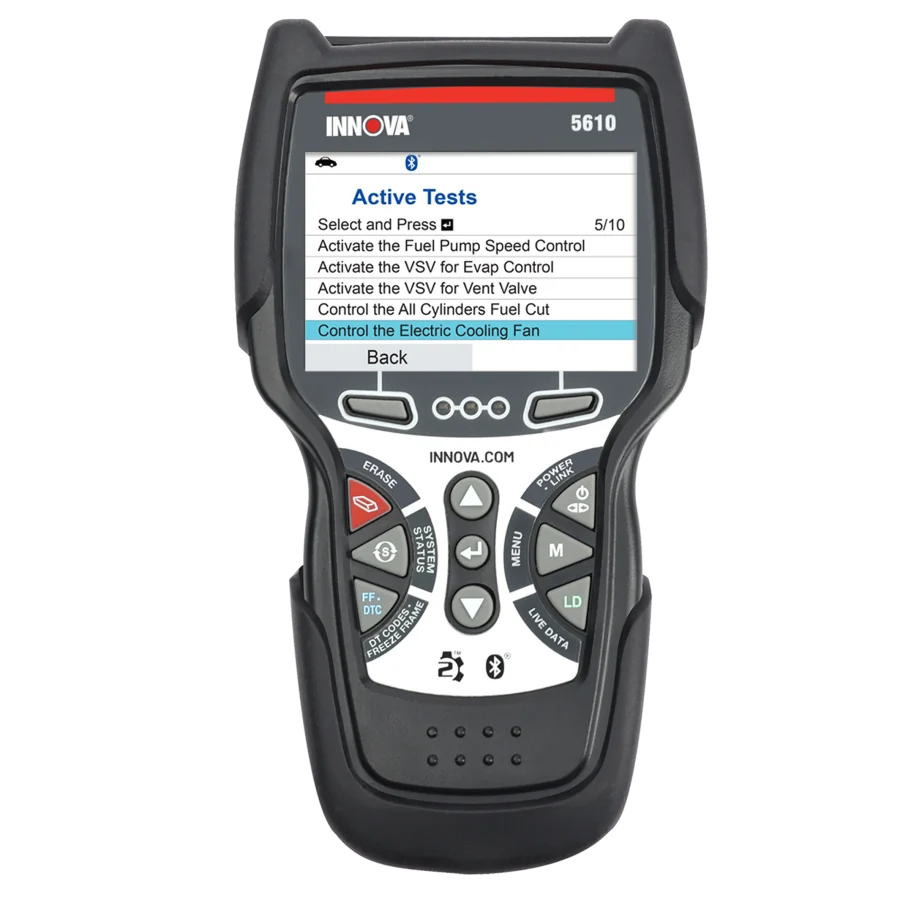
Innova’s official 5610 material lists Electronic Parking Brake Reset among its enhanced service functions. The manufacturer also advertises all-system scanning, live data, bidirectional active tests and a vehicle-specific feature checker. It states that the product is intended for the US and Canadian markets and that feature coverage varies by vehicle.
Why it may fit: The 5610 offers a familiar handheld design instead of a full tablet, and the manufacturer’s feature checker gives a buyer a concrete way to ask if the desired operation is supported. Innova currently advertises free updates and no subscription for the 5610, subject to its policy and product support.
Limitations: Do not equate an EPB Reset label with every possible parking-brake service. Confirm whether the exact make/model/year provides the motor service mode and any required calibration. On newer gateway-protected vehicles, authorization limits may apply, so check the manufacturer’s current feature and security access policies.
Best suited to: A North American owner wanting a broadly capable handheld scanner and a specific confirmed EPB function, rather than a tablet packed with unneeded professional menus.
How to verify compatibility before placing an order
The best question to send a manufacturer is not “Does this scanner work on my car?” It is: Does this exact US model, with its current software, support the manufacturer’s electronic-parking-brake service or replacement procedure for my year, make, model, engine and brake system? If so, what function name appears in the menu, and is any gateway authorization or additional accessory required?
Keep the reply and the date, since manufacturers may update coverage. Record whether the answer covers basic diagnosis, service-mode entry, release/restore, or a post-replacement learn. The statement “EPB supported” is insufficient when an unsupported step could leave the brakes incorrectly configured.
Check the replacement brake components and service instructions independently. A working diagnostic menu does not prove the hardware was installed correctly or that the vehicle is safe to drive. If the brake system fails a post-service check or shows a warning, stop and seek qualified help rather than clearing codes to hide the condition.
Buy a scanner or pay a repair shop?
For a one-off rear brake job on a single vehicle, the economics may favor a competent professional who already owns the approved tool and has access to service information. If you also need code diagnosis, live data, battery registration, service resets and repeated ownership tasks, a scanner can be a reasonable longer-term purchase. Compare the total cost of hardware, software renewals and required adapters against the genuine jobs you can safely perform—not hypothetical savings from every feature in the menu.
Owners of multiple vehicles should build a table of actual tasks. For example, one vehicle might need an EPB motor service mode, another an ABS hydraulic routine and a third just an oil interval reset. Because these are separate functions, it is entirely possible that one scanner covers two jobs but not the third. Never treat a long “supports 10,000 vehicles” claim as a guarantee for function-level compatibility.
A purchase decision worksheet for three common scenarios
A scanner recommendation changes considerably with the situation. Consider three realistic buyer profiles without assuming a tool is certified for a particular car.
The one-car owner replacing rear brake pads. If the factory maintenance information requires entering EPB service mode, the primary question is whether the exact routine is supported. This owner may care little about topology mapping or dozens of unrelated service icons. If the scanner costs more than obtaining safe professional brake service, buying the tool for one job is not automatically economical. Ask the prospective service provider what the job includes; do not compare only the price of a scanner against a parts-only estimate.
A household maintaining several cars. The buyer might need the EPB routine on one vehicle, battery replacement registration on another, and ordinary powertrain diagnosis across both. A full-system tablet can offer better long-term utility, but only if those three functions have been confirmed separately. The fact that a product supports one car’s ABS module does not imply it supports the other car’s parking-brake controller. Keep an independent compatibility line for each vehicle and operation.
A small repair shop. A shop should consider records, regular updates, multiple model years, technician training, secure-gateway authorization and access to current service information. A scanner purchase that suits home maintenance might not cover a changing customer fleet. The correct equipment budget may include licensed diagnostic access, specialized adapters and additional tools rather than only the tablet and VCI.
A written three-column choice table helps: required confirmed functions, functions useful but optional, and features that do not affect your work. Reject a device when it fails the first column, even if it wins the other two. This is more useful than declaring a “best overall” based on unverified performance claims.
What to do when the coverage database gives an ambiguous answer
A manufacturer’s public checker may list a vehicle brand or model without giving an explicit description of the EPB maintenance path. Treat that answer as not yet verified, not as approval. Some vehicles have different brake controllers depending on build date, trim, market or brake hardware. A support agent may need more information to distinguish the correct function.
Send the exact vehicle information, describe the repair and request the menu name. Ask whether the process involves only service-mode entry or additionally closing, calibration, initialization, fault verification or a required relearn. Ask whether a secure gateway or paid function is required and whether the US-market unit offers it today. A vague response like “this model supports brakes” should not be the basis of a purchase.
If the response remains unclear, consider an approved professional service solution rather than experimenting with live brake actuators. A diagnostic product review cannot establish a safe procedure for a vehicle it has never examined.
Common questions
Can a basic OBD2 code reader retract electronic brake calipers?
Usually, a basic emissions-oriented code reader is not designed for manufacturer-specific parking-brake service commands. Confirm the actual vehicle routine before buying a more advanced tool.
Does an EPB reset repair a parking-brake fault?
No. A reset or service command is not proof that a damaged actuator, wiring issue or hydraulic problem has been repaired. Diagnostic assessment and correct mechanical service are separate.
Is ABS bleeding included whenever a scanner supports EPB service?
No. The two functions concern different parts of the braking system. Check each function independently, including whether it is available for your vehicle.
Do I need to renew scanner software every year?
That depends on the product and your need for new coverage. TOPDON’s current 900BT update policy differs from its 900 Lite policy; XTOOL advertises three years on the D7S/D8S; Innova advertises free updates for the 5610. Reconfirm terms on the purchase date.
Does a “bidirectional” label guarantee EPB maintenance mode?
No. Bidirectional describes the ability to send certain supported commands to a vehicle. The particular command and system coverage still have to be verified.
Final recommendation
The most useful purchase isn’t necessarily the scanner with the most menus. Begin with the MK900-BT if its documented EPB workflow, wireless interface and broader diagnostics fit your needs and Autel confirms the car. Consider the ArtiDiag900 Lite if TOPDON confirms the brake procedure and you prefer the currently published update approach. For larger maintenance portfolios, compare the ArtiDiag900BT and XTOOL D7S/D8S; for a handheld US-market alternative, inspect Innova 5610 coverage closely.
Do not purchase any of these based on this shortlist alone. The responsible final recommendation is conditional on a written manufacturer-supported function match, an authentic current product listing, the correct vehicle procedure, and your ability to perform brake work safely.
Source references
- Autel MaxiCOM MK900-BT product specifications
- Autel MK900-BT user manual, EPB service and safety
- TOPDON ArtiDiag900 Lite official US page
- TOPDON ArtiDiag900BT official US page
- TOPDON 900BT annual update listing
- XTOOL D7S manufacturer specifications
- XTOOL D8S manufacturer specifications
- Innova 5610 official product information